Neon
Integrate Neon with Strapi to power your headless CMS with serverless Postgres. Connect Neon's autoscaling database, instant branching, and scale-to-zero capabilities to build content-driven applications that handle traffic spikes without manual provisioning

What Is Neon?
Neon is a serverless PostgreSQL platform that separates compute from storage, enabling features impossible with traditional database architectures. According to Neon's architecture documentation, the system runs stateless compute nodes for query execution while maintaining data in a distributed storage layer designed specifically for Postgres pages.
This separation of storage and compute delivers three concrete capabilities: compute resources that scale to zero during inactivity through automatic suspension, instant database branches using copy-on-write mechanisms that share unchanged data with the parent branch, and built-in connection pooling supporting up to 10,000 concurrent connections.
You define minimum and maximum compute boundaries, and Neon automatically adjusts resources within those bounds based on actual query load—no manual intervention or application restarts required.
The architecture particularly benefits serverless applications and development workflows. Database branches create production-scale copies in seconds without duplicating data initially, enabling Git-aligned preview environments. Scale-to-zero capability means development databases consume resources only during active use, reducing costs by approximately 78% compared to always-on instances.
Why Integrate Neon with Strapi?
Four specific technical advantages make Neon particularly suited for Strapi CMS deployments:
- Autoscaling with scale-to-zero reducing development compute costs by 78% through suspension during idle periods
- Instant database branching using copy-on-write clones for Git-aligned preview deployments
- Built-in connection pooling supporting up to 10,000 concurrent connections with sub-10ms establishment times (vs. traditional Postgres connection limits)
- Eliminated DevOps overhead via automatic backups with 7-day retention, automatic multi-AZ replication, and continuous monitoring without manual intervention
How to Integrate Neon with Strapi
The integration requires three components: a Neon database with pooled connection credentials, Strapi's database configuration with SSL/TLS, and proper environment variable management.
Create Neon Database
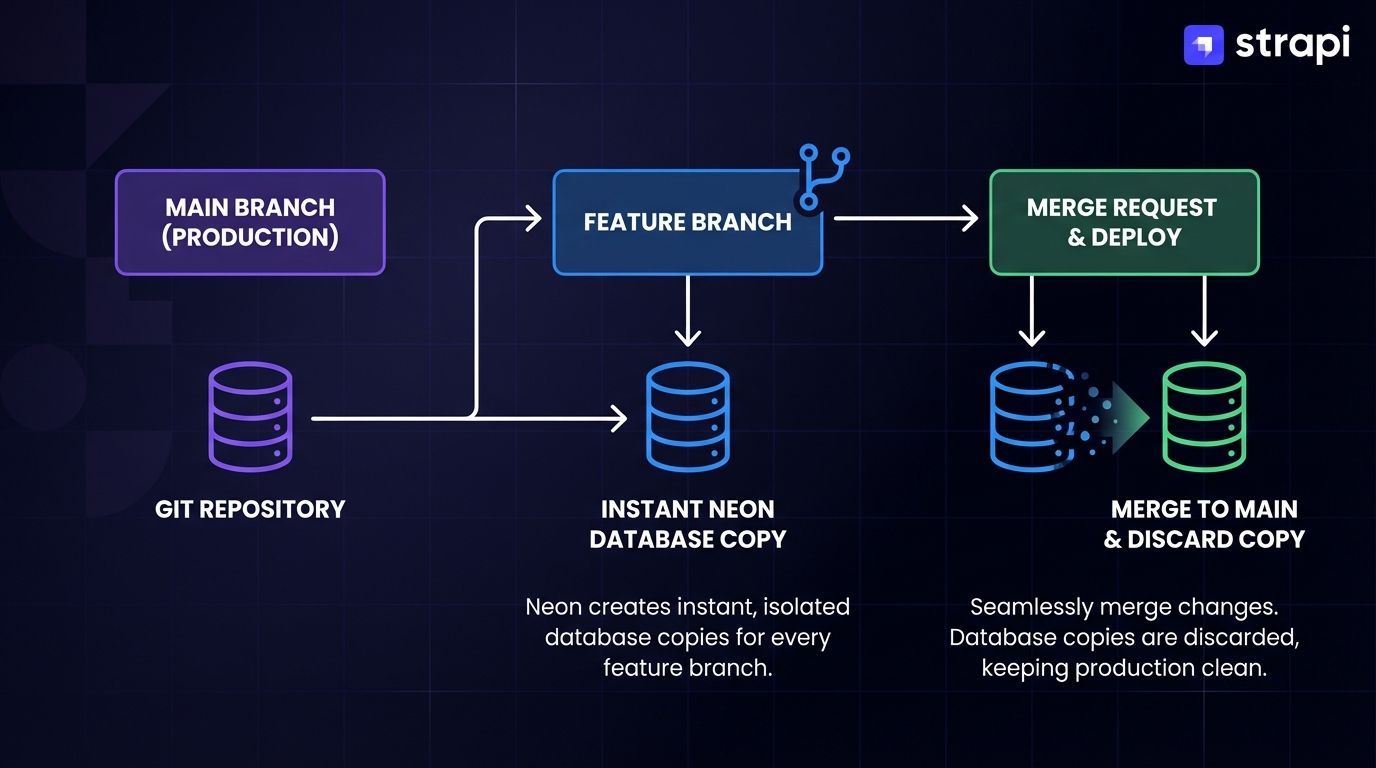 Sign up at the Neon Console and create a new project. The dashboard provides two connection string formats. Copy the pooled connection string (identified by the
-pooler suffix in the hostname) with SSL parameters included:
postgresql://[user]:[password]@[endpoint]-pooler.neon.tech/[dbname]?sslmode=require&channel_binding=requireThis pooled endpoint is recommended for Strapi runtime, as it optimizes connection handling for serverless applications. The alternative direct connection (without -pooler) should only be used for database utilities like migrations.
postgresql://alex:AbC123dEf@ep-cool-darkness-a1b2c3d4-pooler.neon.tech/dbname?sslmode=require&channel_binding=requireNeon's pooled endpoints use integrated PgBouncer connection pooling, which prevents connection exhaustion during traffic spikes by managing connections efficiently. Direct connections (without -pooler) should only be used for database utilities like pg_dump or schema migration tools.
Create Strapi Project
Initialize a new Strapi 5 project using the official CLI:
npx create-strapi-app@latest my-project --typescriptWhen prompted for database selection, choose PostgreSQL. Strapi will generate configuration templates you'll modify in the next step.
Configure Database Connection
Modify config/database.js (or config/database.ts for TypeScript projects) with your Neon credentials:
module.exports = ({ env }) => ({
  connection: {
    client: 'postgres',
    connection: {
      connectionString: env('DATABASE_URL'),
      ssl: {
        rejectUnauthorized: false
      }
    },
    pool: {
      min: env.int('DATABASE_POOL_MIN', 2),
      max: env.int('DATABASE_POOL_MAX', 10),
    },
  },
});
The connectionString parameter simplifies configuration by consolidating all connection details into a single variable. According to Neon's security documentation, SSL/TLS encryption is mandatory for all Neon connections, and the ssl.rejectUnauthorized: false setting is required in Strapi's database configuration to properly handle Neon's SSL certificates while the connection string itself must include ?sslmode=require&channel_binding=require for encrypted security.
Alternative configuration using discrete parameters:
module.exports = ({ env }) => ({
  connection: {
    client: 'postgres',
    connection: {
      host: env('DATABASE_HOST'),
      port: env.int('DATABASE_PORT', 5432),
      database: env('DATABASE_NAME'),
      user: env('DATABASE_USERNAME'),
      password: env('DATABASE_PASSWORD'),
      schema: env('DATABASE_SCHEMA', 'public'),
      ssl: env.bool('DATABASE_SSL', true) && {
        rejectUnauthorized: env.bool('DATABASE_SSL_SELF', false),
      },
    },
    pool: {
      min: env.int('DATABASE_POOL_MIN', 2),
      max: env.int('DATABASE_POOL_MAX', 10),
    },
  },
});
This approach provides finer control over individual connection parameters, useful when different environments require varying configurations.
Set Environment Variables
Create a .env file in your project root with Neon connection credentials:
DATABASE_URL=postgresql://[user]:[password]@[endpoint]-pooler.neon.tech/[dbname]?sslmode=require&channel_binding=require
DATABASE_POOL_MIN=2
DATABASE_POOL_MAX=10
Replace bracketed placeholders with actual values from your Neon dashboard. The connection string must include sslmode=require and channel_binding=require parameters—according to Neon's security documentation, SSL/TLS encryption is mandatory for all Neon connections.
If you're using the discrete parameter approach:
DATABASE_HOST=ep-cool-darkness-a1b2c3d4-pooler.neon.tech
DATABASE_PORT=5432
DATABASE_NAME=dbname
DATABASE_USERNAME=alex
DATABASE_PASSWORD=AbC123dEf
DATABASE_SCHEMA=public
DATABASE_SSL=true
DATABASE_POOL_MIN=2
DATABASE_POOL_MAX=10
Configure Connection Pooling
The pool configuration controls how Strapi manages database connections. Set min: 2 for standard deployments to maintain baseline connections, improving response times for initial requests.
Docker deployments require different settings:
pool: {
  min: env.int('DATABASE_POOL_MIN', 2),  // Set to 0 for Docker
  max: env.int('DATABASE_POOL_MAX', 10),
}
Docker containers terminate idle connections aggressively, causing errors if Strapi attempts to maintain minimum connections. Setting min: 0 allows the pool to drain completely during idle periods.
Advanced pooling parameters for fine-tuned control:
pool: {
  min: env.int('DATABASE_POOL_MIN', 2),
  max: env.int('DATABASE_POOL_MAX', 10),
  acquireTimeoutMillis: 60000,        // Wait 60s for connection acquisition
  createTimeoutMillis: 30000,         // Wait 30s for connection creation
  idleTimeoutMillis: 30000,           // Close idle connections after 30s
  reapIntervalMillis: 1000,           // Check for idle connections every second
}
Start Strapi
Launch the development server:
npm run developStrapi automatically creates required database tables in your Neon database during initialization. Access the admin panel at http://localhost:1337/admin to verify successful connection and create your first administrator account.
Common Configuration Issues
Schema permission errors: If you encounter HTTP 500 errors when loading the admin dashboard, the database user likely lacks schema-level permissions. Connect to your Neon database and grant appropriate access:
CREATE USER my_strapi_db_user WITH PASSWORD 'password@#Strapi';
GRANT ALL ON SCHEMA public TO my_strapi_db_user;
According to Stack Overflow verified solution, if you encounter HTTP 500 errors when loading the Strapi admin dashboard, grant schema-level permissions with the following commands:
CREATE USER my_strapi_db_user WITH PASSWORD 'password@#Strapi';
GRANT ALL ON SCHEMA public TO my_strapi_db_user;
Strapi requires schema-level permissions beyond basic database access for proper functionality.
Strapi requires schema-level privileges beyond basic database access to create and modify content-type tables. According to the official Strapi documentation, these permissions can be explicitly granted via SQL: GRANT ALL ON SCHEMA public TO my_strapi_db_user;
Connection string format errors: Verify your connection string includes the -pooler suffix and SSL parameters. Missing sslmode=require will cause connection failures since Neon mandates encrypted connections.
SSL certificate warnings: The self signed certificate in certificate chain error occurs when SSL is misconfigured. According to Neon's security documentation, set rejectUnauthorized: false in your SSL configuration rather than disabling SSL entirely—the connection remains encrypted while bypassing strict certificate validation. Neon requires SSL/TLS encryption for all connections, and disabling it will cause connection failures.
Project Example: Blog Platform with Database Branching
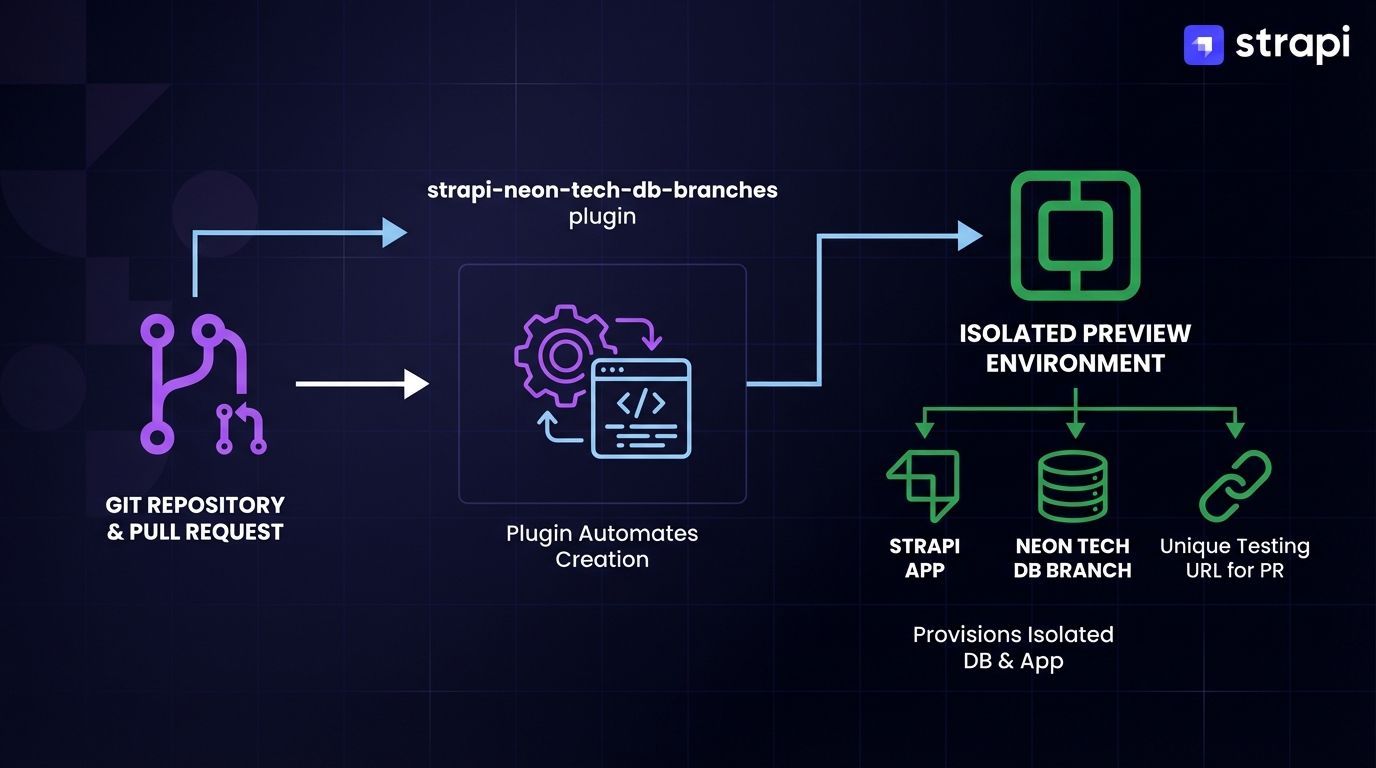 A blog platform demonstrates how Neon's branching capabilities integrate with Strapi's content management features. This architecture uses Strapi as the headless CMS backend with Neon Postgres, consumed by an Astro or Next.js frontend through Strapi's REST API.
Architecture Overview
Frontend (Astro/Next.js) → Strapi REST API → Neon Postgres
                                           ↓
                              Database Branches (feature/preview/main)
The frontend consumes Strapi's REST API to fetch blog posts, author profiles, and categories. Strapi manages this content through its admin panel while storing structured data in Neon Postgres.
According to Neon's branching documentation, database branching uses copy-on-write mechanisms to create instant, isolated clones that share unchanged data with the parent branch. This enables developers to test Strapi content-type schema changes in isolated branches before merging to production without duplicating the entire dataset.
Neon's pooled connection endpoints (identified by the -pooler suffix) handle the connections required for this workflow, supporting up to 10,000 concurrent connections through integrated PgBouncer.
Content-Type Configuration
Define a Blog Post content type in Strapi with fields for title, slug, content (richtext), excerpt, cover image (media), author relation (many-to-one), and categories relation (many-to-many). Create this through Strapi's Content-Type Builder, which is accessible in the admin panel and automatically generates database migrations and API endpoints.
Automated Branch-Based Workflows
Install the strapi-neon-tech-db-branches plugin for automated database branch management. This plugin automatically synchronizes Git branches with Neon database branches, enabling isolated testing environments and preview deployments by configuring Strapi to connect to branch-specific databases (main branch uses neon-branch-main, feature branches use neon-branch-feature-X, etc.):
npm install strapi-neon-tech-db-branchesConfigure the plugin in config/plugins.js:
module.exports = {
  'strapi-neon-tech-db-branches': {
    enabled: true,
    config: {
      neonApiKey: process.env.NEON_API_KEY,
      neonProjectName: process.env.NEON_PROJECT_NAME,
      neonRole: process.env.NEON_ROLE,
    }
  }
}
Add required environment variables:
NEON_API_KEY=your_api_key
NEON_PROJECT_NAME=your_project_name
NEON_ROLE=your_database_role
GIT_BRANCH=feature/my-feature
The strapi-neon-tech-db-branches plugin automatically creates Neon database branches matching your Git branches. When you create a feature branch feature/add-video-field, the plugin automatically creates a corresponding Neon database branch named neon-branch-feature-add-video-field and injects the correct PostgreSQL connection string into Strapi's configuration, enabling your feature branch to use an isolated database with a copy of production data.
- Detects the Git branch name from
GIT_BRANCHenvironment variable - Creates a Neon database branch (named based on the Git branch, e.g.,
neon-branch-feature-add-video-field) - Initializes it with data from the main branch
- Configures Strapi to connect to the branch-specific database
This enables safe schema testing. You can add a video field to your Post content type, test the migration on branch data, and delete the database branch if issues arise—all without touching production data.
Frontend Integration
The frontend consumes Strapi's REST API to fetch blog posts. Configure your frontend framework (Astro, Next.js, or Gatsby) to make authenticated requests to Strapi's API endpoints, using the populate parameter to include related content like authors and cover images. The populate=* parameter instructs Strapi to include related data (author, categories, images) in the response.
Preview Deployment Workflow
Configure your CI/CD pipeline to set the GIT_BRANCH environment variable and deploy to your chosen platform. The strapi-neon-tech-db-branches plugin will automatically detect the branch name and create the corresponding database branch. For Railway deployments, set environment variables through the Railway dashboard, CLI, or imported from .env files, not via a railway.json file.
The strapi-neon-tech-db-branches plugin enables branch-specific database connections, where each Git branch (including pull requests) automatically connects to an isolated Neon database branch. Reviewers can test content-type changes with data inherited from the parent branch before merging.
Strapi Open Office Hours
If you have any questions about Strapi 5 or just would like to stop by and say hi, you can join us at Strapi's Discord Open Office Hours, Monday through Friday, from 12:30 pm to 1:30 pm CST: Strapi Discord Open Office Hours.
For more details, visit the Strapi documentation and Neon documentation.
Frequently Answered Questions
Railway, Render, and DigitalOcean are recommended platforms for production Strapi deployments with Neon. Vercel is incompatible with Strapi backend hosting due to serverless limitations preventing persistent Node.js processes. For Railway, configure environment variables including DATABASE_URL, NODE_ENV=production, security keys (APP_KEYS, API_TOKEN_SALT, ADMIN_JWT_SECRET), and pool settings. Both Railway and Render use ephemeral file systems, so integrate Cloudinary or AWS S3 for media uploads before deployment. See the Strapi deployment documentation for details.
Neon provides two endpoint types with different use cases. Pooled connections (identified by -pooler in the hostname) route through PgBouncer and support up to 10,000 concurrent connections. Use pooled endpoints for Strapi runtime connections in serverless or high-concurrency deployments. Direct connections bypass PgBouncer but still go through Neon's proxy service. These are appropriate for database utilities requiring transaction isolation like pg_dump, schema migration tools, or administrative tasks requiring stable, long-lived connections.
Direct SQLite to PostgreSQL migrations encounter schema incompatibilities due to how Strapi generates database constraints differently across engines. Use Strapi's built-in Data Transfer features for content migration. Export content from your current instance, create a fresh Strapi installation configured with Neon PostgreSQL, then import the exported content. For large content volumes, use CLI-based commands like strapi transfer to automate the process. Neon's branching workflow enables creating test branches for validating migrations before committing to production.
This error indicates you're not using Neon's pooled endpoint. Standard PostgreSQL direct connections are limited to approximately 100 concurrent connections per compute unit, while Neon's built-in connection pooling supports up to 10,000 concurrent connections. Verify your connection string includes the -pooler suffix in the hostname. Also check your Strapi pool configuration sets reasonable maximum limits. For Docker deployments, set pool.min: 0 to prevent maintaining idle connections that containers terminate aggressively.
Neon's free tier provides 0.5 GiB storage and 100 CU-hours monthly with scale-to-zero capability. This supports low-traffic production applications, personal projects, or staging environments effectively. Core features including branching, connection pooling, and autoscaling are available across all pricing tiers. The free tier works well for Next.js, Gatsby, or Astro frontends with Strapi backends serving moderate request volumes. For higher traffic or specific compliance requirements, explore paid tier options offering extended backup retention and advanced features.