Supabase
Integrate Supabase with Strapi to combine backend-as-a-service capabilities with headless CMS flexibility. Connect Supabase's PostgreSQL database, authentication, and real-time subscriptions to manage and deliver content through Strapi's API-first architecture

What Is Supabase?
Supabase is an open-source backend-as-a-service platform built on PostgreSQL that provides full-stack developers with managed database infrastructure, authentication, object storage, and real-time subscriptions. Unlike Firebase's proprietary NoSQL approach, Supabase gives you access to PostgreSQL's full SQL capabilities with ACID compliance, complex queries with JOINs, and native JSON support through JSONB.
Supabase automatically generates REST and GraphQL APIs from your PostgreSQL schema and supports self-hosting for the entire stack through its open-source architecture, providing flexibility beyond managed services.
Why Integrate Supabase with Strapi
Connecting Supabase with Strapi provides full-stack developers with enterprise-grade backend infrastructure that accelerates feature delivery by combining a managed PostgreSQL database, authentication system, file storage, and real-time capabilities in a single integrated platform.
- Managed PostgreSQL Database: Get enterprise database features like advanced indexing, JSONB support, and full SQL capabilities without managing infrastructure. Configure Strapi's database connection once to eliminate monitoring, backups, and version updates.
- Built-In Authentication: Access a production-ready authentication system with email/password, OAuth, magic links, multi-factor authentication, and JWT-based sessions. Supabase Auth integrates with PostgreSQL's Row Level Security while Strapi's user permissions handle content-level access control.
- Scalable Storage with CDN: Supabase Storage provides object storage with CDN distribution for global access and Row Level Security for file-level access control. The Strapi upload provider integrates directly with Strapi's media library, eliminating separate S3-compatible storage configuration.
- Real-Time Capabilities: Supabase Realtime enables database change subscriptions, broadcast channels for client-to-client messaging, and presence tracking—all delivered through WebSockets without managing separate infrastructure.
How to Integrate Supabase with Strapi
The integration requires configuring Strapi's database connection to point at Supabase's PostgreSQL instance. This involves three configuration files and environment variables.
Retrieve Supabase Connection Details
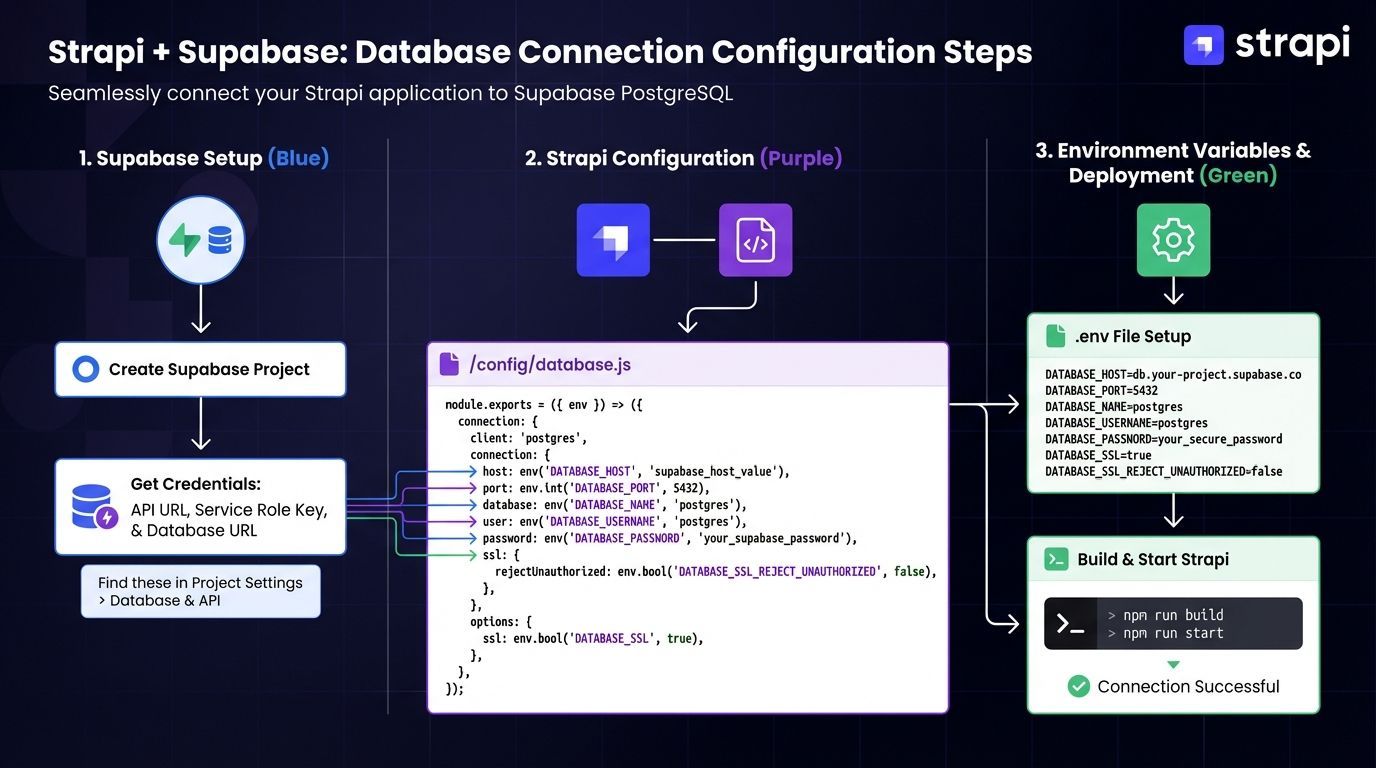 Log into your Supabase dashboard and navigate to Project Settings > Database. You'll find four connection methods available. For Strapi deployments, use the Session Mode Pooled connection (port 5432), which is recommended for CMS platforms as it maintains session state throughout the connection lifecycle and supports IPv4 networks:
For Supabase Session Mode (recommended for Strapi), use this connection string pattern:
postgres://postgres.xxxxx:[YOUR-PASSWORD]@aws-0-[REGION].pooler.supabase.com:5432/postgresImportant: Never commit actual connection strings with real passwords to version control. Always store credentials in environment variables using a .env file, as documented in the Strapi Database Configuration Guide.
For serverless deployments, use Transaction mode pooling on port 6543, optimized for transient connections.
Configure Environment Variables
Create a .env file in your Strapi project root with your Supabase credentials. The Strapi 5 Database Configuration Documentation shows you can use either a complete connection string or individual connection parameters:
# Database Configuration
DATABASE_CLIENT=postgres
DATABASE_URL=postgres://postgres:[YOUR-PASSWORD]@db.abcdefghijklmnopqrst.supabase.co:5432/postgres

# Alternative: Individual connection parameters
DATABASE_HOST=db.abcdefghijklmnopqrst.supabase.co
DATABASE_PORT=5432
DATABASE_NAME=postgres
DATABASE_USERNAME=postgres
DATABASE_PASSWORD=[YOUR-PASSWORD]
DATABASE_SCHEMA=public
DATABASE_SSL=true

# Connection Pool Settings
DATABASE_POOL_MIN=2
DATABASE_POOL_MAX=10
Important: Use either DATABASE_URL OR individual parameters, but not both simultaneously. The connection string approach simplifies configuration when deploying to multiple environments.
Update Strapi Database Configuration
Create or update config/database.js with this production-ready configuration:
module.exports = ({ env }) => ({
  connection: {
    client: 'postgres',
    connection: {
      connectionString: env('DATABASE_URL'),
      schema: env('DATABASE_SCHEMA', 'public'),

      // SSL Configuration for Supabase
      ssl: env.bool('DATABASE_SSL', false) && {
        rejectUnauthorized: env.bool('DATABASE_SSL_SELF', false),
      },
    },

    // Connection Pool Configuration
    pool: {
      min: env.int('DATABASE_POOL_MIN', 2),
      max: env.int('DATABASE_POOL_MAX', 10),
    },

    debug: false,
  },
});
The conditional SSL pattern only creates the SSL object when DATABASE_SSL is true. Set rejectUnauthorized: false for Supabase unless you're using custom SSL certificates.
Configure Connection Pooling
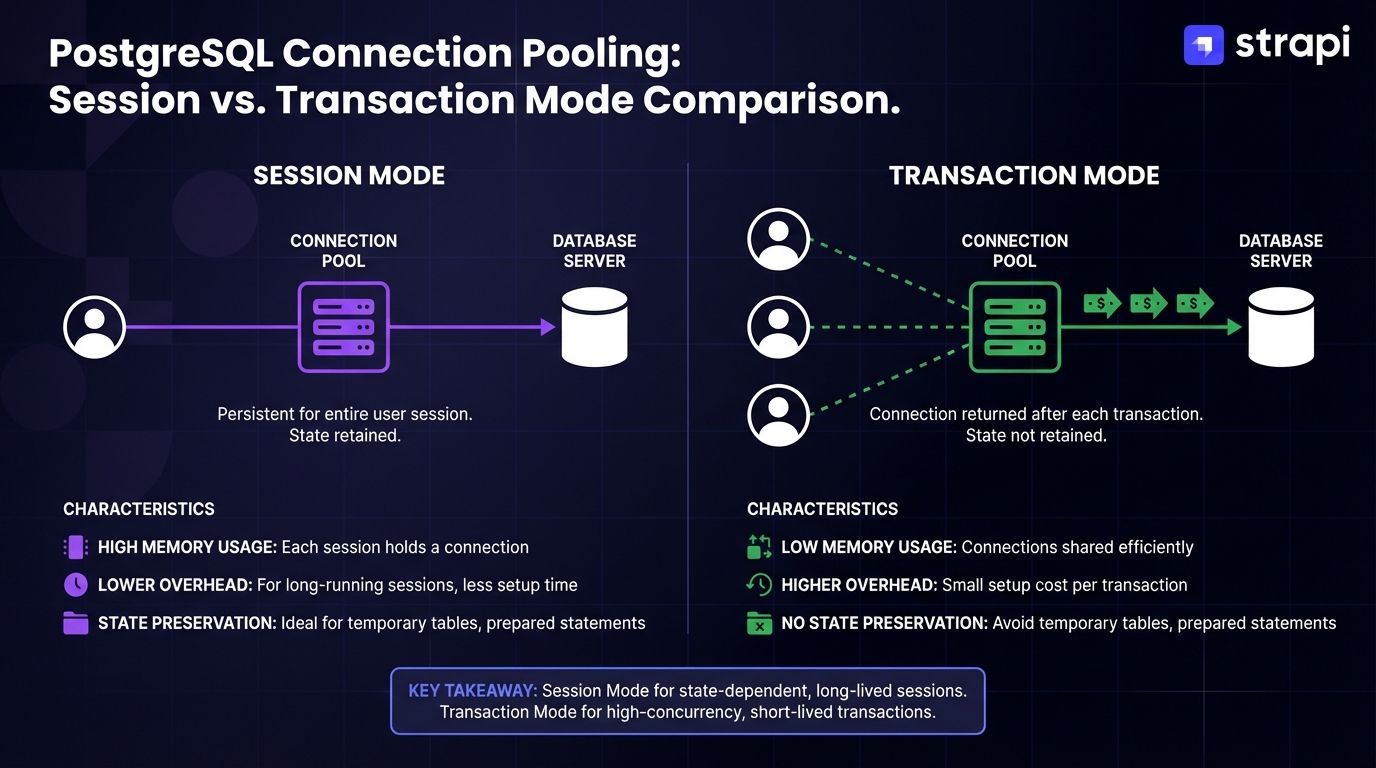 Connection pool limits depend on your Supabase plan's connection capacity. According to the Supabase connection management documentation, Supabase recommends keeping the pool below 40% of total connections for heavy PostgREST API usage, or up to 80% for lighter workloads. Use Session Mode (port 5432) for traditional servers and Transaction Mode (port 6543) for serverless deployments to optimize connection efficiency.
If you're running Strapi in Docker containers, set min: 0 in your connection pool configuration to prevent issues with killed idle connections.
Verify the Integration
Start your Strapi development server:
npm run developStrapi will automatically create necessary tables, run migrations, and set up the schema in PostgreSQL. The admin panel should load at http://localhost:1337/admin in a standard Strapi 5 development setup, but its successful loading does not reliably confirm successful database connectivity.
If you encounter permission errors, execute these SQL grants in the Supabase SQL Editor:
GRANT SELECT, INSERT, UPDATE, DELETE ON ALL TABLES IN SCHEMA public TO postgres;
GRANT USAGE ON ALL SEQUENCES IN SCHEMA public TO postgres;
Supabase's default security posture implements more restrictive permissions than standard PostgreSQL, requiring explicit privilege grants for database operations.
Add Supabase Storage Integration
To store media files in Supabase Storage instead of local filesystem, install the community-maintained Strapi upload provider. The Strapi Marketplace and arkivedao GitHub repository show the actively maintained plugin is the arkivedao fork of strapi-provider-upload-supabase (note: the original plugin is no longer maintained):
npm install strapi-provider-upload-supabaseConfigure the plugin in config/plugins.js:
module.exports = ({ env }) => ({
  upload: {
    config: {
      provider: 'strapi-provider-upload-supabase',
      providerOptions: {
        apiUrl: env('SUPABASE_API_URL'),
        apiKey: env('SUPABASE_API_KEY'),
        bucket: env('SUPABASE_BUCKET'),
        directory: env('SUPABASE_DIRECTORY'),
      },
    },
  },
});
Add the corresponding environment variables to .env:
SUPABASE_API_URL=https://abcdefghijklmnopqrst.supabase.co
SUPABASE_API_KEY=your-supabase-anon-key
SUPABASE_BUCKET=strapi-uploads
SUPABASE_DIRECTORY=media
Update Content Security Policy in config/middlewares.js to allow loading images from Supabase by adding the Supabase domain to the img-src directive:
module.exports = [
  'strapi::errors',
  {
    name: 'strapi::security',
    config: {
      contentSecurityPolicy: {
        directives: {
          'img-src': ["'self'", 'data:', 'blob:', '*.supabase.co'],
          'media-src': ["'self'", 'data:', 'blob:', '*.supabase.co'],
        },
      },
    },
  },
  'strapi::cors',
  'strapi::poweredBy',
  'strapi::logger',
  'strapi::query',
  'strapi::body',
  'strapi::session',
  'strapi::favicon',
  'strapi::public',
];
Without proper Content Security Policy (CSP) configuration in config/middlewares.js, uploaded images from Supabase Storage won't load in the Strapi admin panel. You need to add Supabase domain to your CSP directives and restart your development server to apply the changes.
Project Example: E-Commerce Product Catalog with Real-Time Inventory
This implementation demonstrates building an e-commerce backend where Strapi manages product content while Supabase provides database persistence, storage for product images, and real-time inventory updates.
Architecture Overview
- Strapi Layer: Content modeling for products, categories, and promotional content through the Content-Type Builder. The API system auto-generates REST and GraphQL endpoints.
- Supabase Layer: PostgreSQL stores relational product data with support for advanced indexing and JSONB for flexible schema design. Storage handles product images with CDN delivery through the configured upload provider. Realtime subscriptions listen to database changes (INSERT, UPDATE, DELETE) on inventory tables and broadcast updates to subscribed clients via WebSocket connections.
- Frontend Layer: Next.js application consumes Strapi's REST and GraphQL APIs for product catalog and Supabase client libraries for real-time inventory updates.
Create Product Content Type
In the Strapi admin panel, navigate to Content-Type Builder and create a new Collection Type named "Product". The Strapi Content-Type Builder Documentation provides detailed guidance. When you run migrations or initialize Strapi, it automatically creates corresponding database tables in PostgreSQL and generates API endpoints at /api/products.
Configure Real-Time Inventory Tracking
Install the Supabase JavaScript client in your frontend application:
npm install @supabase/supabase-jsCreate a Supabase client instance and subscribe to product table changes:
import { createClient } from '@supabase/supabase-js';

const supabase = createClient(
  process.env.NEXT_PUBLIC_SUPABASE_URL,
  process.env.NEXT_PUBLIC_SUPABASE_ANON_KEY
);

// Subscribe to database changes on products table
const subscription = supabase
  .channel('product-inventory')
  .on('postgres_changes',
    {
      event: 'UPDATE',
      schema: 'public',
      table: 'products'
    },
    (payload) => {
      console.log('Inventory updated:', payload.new);
      // Update UI with new inventory data
    }
  )
  .subscribe();
Implement Product API with Strapi
Fetch products from Strapi's REST API:
// Example implementation - adapt population and filtering to your schema
async function getProducts() {
  const baseUrl = process.env.STRAPI_API_URL;

  const response = await fetch(`${baseUrl}/api/products?populate=*`, {
    headers: {
      'Authorization': `Bearer ${process.env.STRAPI_API_TOKEN}`
    }
  });

  const data = await response.json();
  return data.data;
}
The populate=* parameter includes related data like category information and uploaded images stored in Supabase Storage.
Handle Product Image Uploads
When the Supabase upload provider is configured in config/plugins.js, files uploaded through Strapi's Media Library are stored in Supabase Storage and accessed through Strapi's response with CDN URLs. Supabase Storage provides automatic CDN distribution for fast global access to stored files.
Images load from Supabase's CDN with automatic optimization based on requested dimensions. Access the image URLs from your Strapi API response to display product images in your frontend application.
Update Inventory Through Strapi API
When customers complete purchases, update inventory through Strapi's auto-generated REST API endpoints. Strapi provides standard REST operations (GET, POST, PUT, DELETE) on your content types. When using Supabase as Strapi's PostgreSQL database backend, inventory changes made through Strapi's API are persisted to the Supabase PostgreSQL database.
Connected clients can subscribe to database changes (INSERT, UPDATE, DELETE events) through Supabase's WebSocket-based subscriptions, enabling real-time inventory notifications to be pushed to connected clients when records are modified.
Production Deployment Considerations
For production deployments, configure environment-specific database connections. Create ./config/env/production/database.js:
module.exports = ({ env }) => ({
  connection: {
    client: 'postgres',
    connection: {
      connectionString: env('DATABASE_URL'),
      schema: env('DATABASE_SCHEMA', 'public'),
      ssl: env.bool('DATABASE_SSL', false) && {
        rejectUnauthorized: env.bool('DATABASE_SSL_SELF', false),
      },
    },
    pool: {
      min: env.int('DATABASE_POOL_MIN', 2),
      max: env.int('DATABASE_POOL_MAX', 10),
      acquireTimeoutMillis: 60000,
    },
    debug: false,
  },
});
Deploy your Strapi application to hosting providers that support Node.js applications. Common choices include Render, DigitalOcean, AWS, or Strapi Cloud for managed hosting with automatic scaling.
Strapi Open Office Hours
If you have any questions about Strapi 5 or just would like to stop by and say hi, you can join us at Strapi's Discord Open Office Hours, Monday through Friday, from 12:30 pm to 1:30 pm CST: Strapi Discord Open Office Hours.
For more details, visit the Strapi documentation and Supabase documentation.
Frequently Answered Questions
According to Supabase's pricing documentation, Supabase's free tier provides 500MB database storage, 1GB file storage, and 50,000 monthly active users—sufficient for MVP development, side projects, or low-traffic applications. Production applications with significant traffic should consider Supabase's Pro tier for higher connection limits, automated backups, and point-in-time recovery. The Strapi documentation specifies default connection pool settings of DATABASE_POOL_MIN=2 and DATABASE_POOL_MAX=10. Monitor your connection pool usage through the Supabase dashboard, as each plan tier has specific connection limits based on your subscription level.
Session mode and transaction mode pooling serve different deployment scenarios. Supabase's PostgreSQL connection documentation describes its characteristics:
- Session Mode Pooling (Port 5432): Maintains session state throughout the entire connection lifecycle. It's optimized for persistent clients on IPv4 networks and explicitly recommended for CMS platforms like Strapi that require stable, long-lived connections.
- Transaction Mode Pooling (Port 6543): Purpose-built for serverless and edge function deployments. It manages connection lifecycle on a per-transaction basis, maximizing connection efficiency in ephemeral environments.
| Aspect | Session Mode (5432) | Transaction Mode (6543) |
|---|---|---|
| Use Case | Traditional servers, CMS platforms | Serverless, edge functions |
| Session State | Preserved throughout connection | Reset between transactions |
| Best For | Strapi, persistent applications | Serverless deployments |
For Strapi specifically, use session mode pooling on port 5432 because Strapi maintains application state and requires consistent session handling throughout its operations.
While technically possible, merging authentication systems adds significant complexity without proportional benefits. The recommended architecture maintains separation: use Strapi's Users & Permissions plugin for admin panel access and content-level permissions, while Supabase Auth handles end-user authentication in your frontend application.
If you need unified user management, implement a synchronization layer that creates corresponding records in both systems. Attempting to replace Strapi's authentication entirely requires modifying core functionality and breaks admin panel access. For most use cases, parallel authentication systems with clear separation of concerns provide better maintainability.
This indicates missing Content Security Policy configuration for Supabase Storage domains. Update config/middlewares.js to include '*.supabase.co' in the img-src and media-src directives, as shown in the storage integration section above. The browser blocks loading resources from external domains unless explicitly allowed in the CSP header. Verify the upload provider configuration in config/plugins.js includes correct Supabase credentials using the actively maintained arkivedao Supabase upload provider. Check the browser developer console for CSP violation errors. If images still don't load, confirm your Supabase Storage bucket's RLS policies allow public read access or include proper authentication headers in requests.
Update your database configuration in config/database.js with Supabase PostgreSQL credentials and run Strapi's development server. Strapi's migration system will automatically create the necessary database schema in your Supabase PostgreSQL instance. The Strapi Database Configuration Documentation provides the complete configuration structure with SSL settings, connection pooling, and environment variable management required for Supabase connections.