Turso
Integrate Turso with Strapi to power your headless CMS with an embedded SQLite-based database. Connect Turso's edge-native architecture, vector search capabilities, and offline-first design to build content applications that work anywhere—on-device, in-browser, or at the edge

What Is Turso?
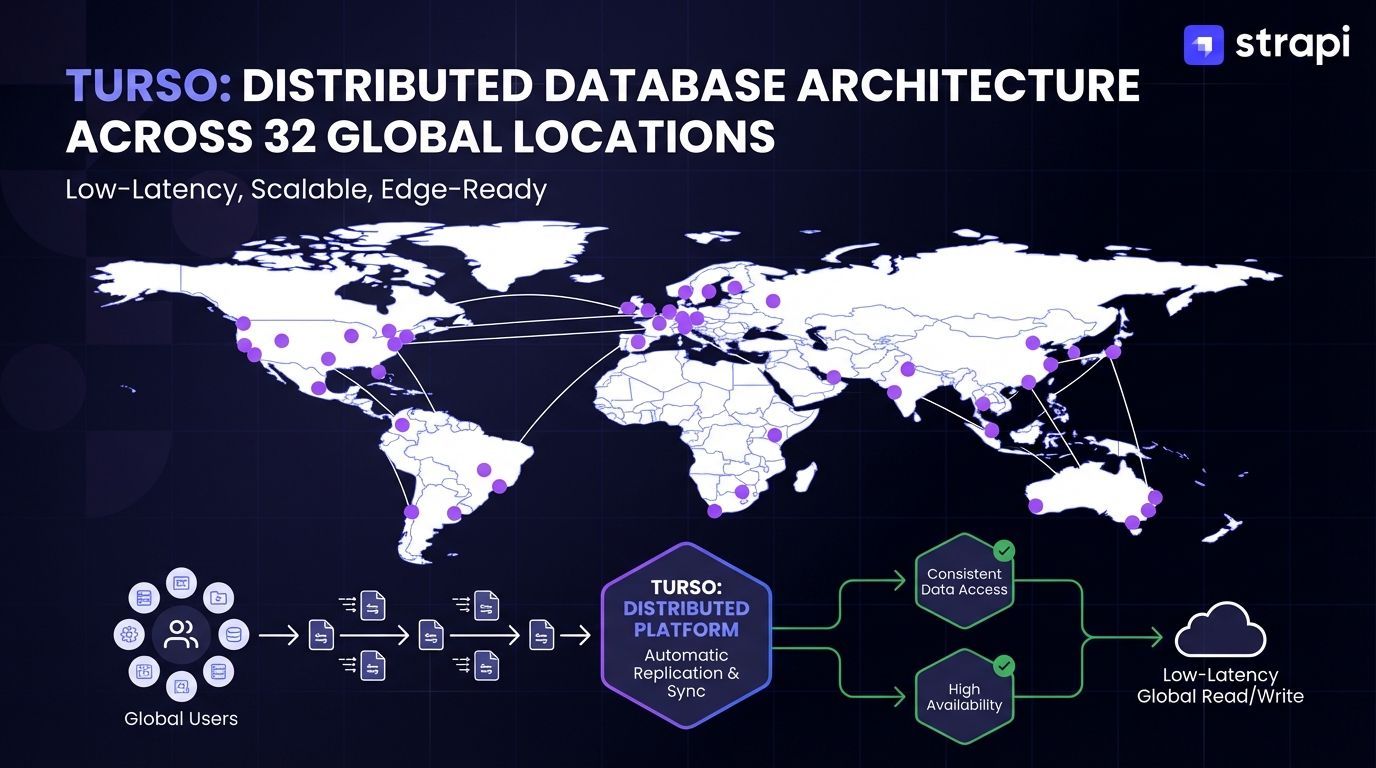
Turso is a fully managed, distributed database platform built on libSQL, an open-source fork of SQLite designed for modern applications. Unlike traditional SQLite, which runs as a local embedded database, Turso adds geographic distribution across 32 locations, embedded replicas for edge deployment, and concurrent write support through multi-version concurrency control (MVCC).
This edge-native architecture brings SQLite's simplicity to globally distributed applications while maintaining full SQLite API and file format compatibility, allowing existing SQLite databases to migrate without schema modifications. For developers familiar with SQLite, Turso provides the same operational simplicity with managed infrastructure that handles replication, backups, and scaling automatically.
Why Integrate Turso with Strapi
 Turso brings SQLite's simplicity to globally distributed applications while adding enterprise-grade features that complement Strapi's headless CMS capabilities. Here are the key benefits:
- Edge Performance for Global Content Delivery: Database replicas across 32 locations worldwide deliver 10-20ms query latencies, eliminating single-region bottlenecks for content management systems serving international audiences.
- SQLite Compatibility with Distributed Capabilities: Full backward compatibility with SQLite 3.x plus MVCC for concurrent writes, enabling multi-user CMS workflows where multiple editors publish simultaneously. Note: integration requires patching Strapi's database client layer.
- Managed Infrastructure with Usage-Based Pricing: Scale-to-zero pricing based on rows read/written and storage eliminates idle infrastructure costs. Free tier includes 1 billion rows read, 25 million rows written, and 9GB storage across 3 locations monthly.
- Database Branching for Development Workflows: Create separate database instances from existing databases for development, staging, and A/B testing without affecting production data.
How to Integrate Turso with Strapi
Strapi does not natively support Turso's LibSQL database. The integration requires patching Strapi's database connector to recognize and handle the LibSQL dialect through Knex.js modifications. This represents a community-maintained solution rather than officially supported configuration.
Prerequisites
Before starting, verify your environment meets these requirements:
- Node.js 18.x or later (compatible with Strapi 4.x)
- Existing or new Strapi 4 application
- Package manager: pnpm (recommended) or npm with patch-package
- Turso account (free tier available)
Install Turso CLI and Create Database
Install the Turso CLI using the appropriate method for your platform:
macOS with Homebrew:
brew install tursodatabase/tap/tursomacOS and Linux with shell script:
curl -sSfL https://get.tur.so/install.sh | bashWindows (requires WSL):
wsl
curl -sSfL https://get.tur.so/install.sh | bash
Authenticate and create your database:
# Login to Turso
turso auth login

# Create database
turso db create my-strapi-db

# Get connection credentials
turso db show my-strapi-db
The turso db show command outputs your database URL and authentication token. Save these values; you'll need them for configuration.
Install Required Dependencies
Install the LibSQL SQLite driver to your Strapi project:
npm install @libsql/sqlite3@^0.3.1Patch Strapi's Database Connector
This step modifies Strapi's source code to support the LibSQL dialect. Initialize the patch directory:
pnpm patch @strapi/database@4.25.9 --edit-dir strapi-db-patchOpen strapi-db-patch/dist/index.js and add the LibSQL client class at the top of the file:
class Client_Libsql extends Client_SQLite3 {
  _driver() {
    return require("@libsql/sqlite3");
  }
}

Object.assign(Client_Libsql.prototype, {
  dialect: "libsql",
  driverName: "libsql",
});
Add the LibsqlDialect class following the existing SqliteDialect pattern:
class LibsqlDialect extends SqliteDialect {
  schemaInspector;

  constructor(db) {
    super(db);
    this.client = "libsql";
  }

  configure() {}
}
Modify the getDialectClass function to recognize the libsql client:
const getDialectClass = (client) => {
  switch (client) {
    case "postgres":
      return PostgresDialect;
    case "mysql":
      return MysqlDialect;
    case "sqlite":
      return SqliteDialect;
    case "libsql":  // Add this case
      return LibsqlDialect;
    default:
      throw new Error(`Unknown dialect ${client}`);
  }
};
Update the getDialectName function:
const getDialectName = (client) => {
  switch (client) {
    case "postgres":
      return "postgres";
    case "libsql":  // Add this case
      return "libsql";
    case "mysql":
    case "mysql2":
      return "mysql";
    case "sqlite":
    case "sqlite-legacy":
      return "sqlite";
    default:
      throw new Error(`Unknown dialect ${client}`);
  }
};
Modify the applySearch function in the patched Strapi database module by adding case "libsql": immediately before the sqlite case. This ensures that search functionality works correctly with the libsql client alongside the existing sqlite implementation.
Update the createConnection function to handle the libsql client:
const createConnection = (config) => {
  const knexConfig = { ...config };

  if (knexConfig.client === "libsql") {
    knexConfig.client = Client_Libsql;
  }

  if (knexConfig.client === "sqlite") {
    const sqlitePackageName = getSqlitePackageName();
    knexConfig.client = clientMap[sqlitePackageName];
  }

  return knex(knexConfig);
};
Commit the patch to finalize the modifications:
pnpm patch-commit 'strapi-db-patch'If you're using npm instead of pnpm, use patch-package as an alternative.
Configure Strapi Database Connection
Create or modify config/database.js with your Turso connection details:
// config/database.js
module.exports = ({ env }) => {
  const connections = {
    libsql: {
      connection: {
        filename: env(
          'DATABASE_URL',
          'wss://your-database-url.turso.io?authToken=your_auth_token'
        ),
      },
      useNullAsDefault: true,
    },
  };

  return {
    defaultConnection: 'libsql',
    connections,
  };
};
For Strapi integration specifically, the connection string must use the wss:// protocol (WebSocket Secure), not https:// or libsql://. The filename property holds the full connection string including the authentication token as a query parameter. This is a Strapi-specific requirement due to the custom database adapter implementation; standard Turso applications use the libsql:// protocol instead.
Set Environment Variables
Create or modify your .env file:
DATABASE_CLIENT=libsql
DATABASE_URL=wss://your-database-name-your-org.turso.io?authToken=eyJhbGc...your-token
Replace your-database-name-your-org in the connection URL with your actual database name and organization slug from the turso db show command, and include your complete authentication token as a query parameter.
Verify the Integration
Start your Strapi instance:
npm run developOn first run, Strapi automatically creates necessary database tables and runs migrations. Check the console output for successful database connection messages without Knex dialect errors.
Access the Admin Panel at http://localhost:1337/admin, create a Content-Type, and add sample data to confirm the integration works correctly.
Verify data persistence in your Turso database:
turso db shell my-strapi-dbThen execute SQL queries:
.tables
SELECT * FROM your_content_type;
Project Example: Global Blog Platform with Edge Content Delivery
This example demonstrates building a multi-region blog platform that leverages Strapi's headless CMS capabilities for content management paired with Turso's edge database for low-latency global content delivery.
Why This Architecture Makes Sense
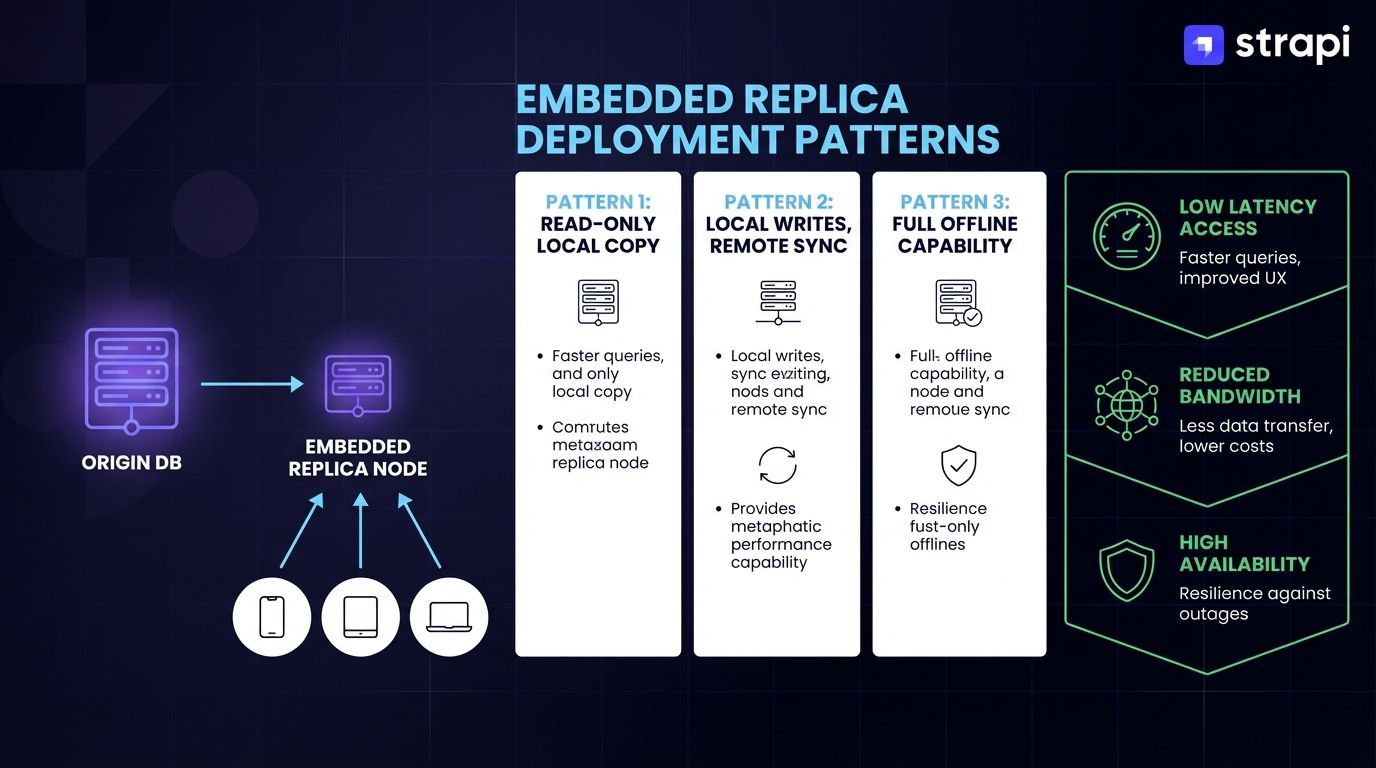 Blog platforms benefit significantly from edge performance, particularly when serving global audiences. When readers browse articles, every database query for post content, author information, and metadata adds latency.
Traditional single-region deployments force users in distant locations to wait for round-trip database queries before content loads. Edge database architecture like Turso eliminates this bottleneck by replicating databases closer to users.
Turso's multi-region infrastructure spans 32 locations worldwide, enabling query latencies in the 10-20ms range compared to significantly higher latencies from centralized database deployments.
Turso's edge-native architecture enables low-latency database access through embedded replicas distributed across multiple regions, with MVCC-based concurrent writes supporting multiple simultaneous transactions.
Combined with Strapi's headless CMS API-first approach, this creates potential for optimized global content delivery, though this integration requires significant custom source code patching and is community-maintained rather than officially supported by either Turso or Strapi.
Content Structure
Define blog-specific content types in Strapi's Content-Type Builder. For this example, you'll create three related content types:
- Blog Post: Include fields for title, content, publication metadata, and relationships to authors and categories.
- Author: Define fields for author information and profile details.
- Category: Create fields for organizing and filtering blog content.
Strapi's Content-Type Builder provides a visual interface for defining these structures. Consult the Content-Type Builder documentation for field type options and relationship configurations.
API Implementation
Strapi automatically generates REST API endpoints for all content types you create:
GET /api/:pluralApiId- Find entriesGET /api/:pluralApiId/:documentId- Find one entryPOST /api/:pluralApiId- Create entryPUT /api/:pluralApiId/:documentId- Update entryDELETE /api/:pluralApiId/:documentId- Delete entry
These endpoints are customizable through lifecycle hooks, controllers, services, custom routes and middleware, and multiple authentication methods including API tokens, JWT tokens, and session-based authentication.
Some example API requests include:
# Fetch all published blog posts
GET /api/blog-posts?populate=*&filters[publishedAt][$notNull]=true

# Fetch single post by slug
GET /api/blog-posts?filters[slug][$eq]=integrating-turso-with-strapi&populate=*

# Fetch posts by category
GET /api/blog-posts?filters[categories][slug][$eq]=tutorials&populate=*
The populate=* parameter in Strapi's REST API ensures that all related data from populated fields (such as author details, category associations, and image files) loads in a single request, eliminating the need for multiple sequential API calls to fetch nested relationships.
Frontend Integration
Connect your frontend framework to Strapi's REST API endpoints. Strapi automatically generates endpoints for all content types (detailed in the API Implementation section above). Your implementation will vary based on your chosen framework. Refer to Strapi's framework-specific integration guides for Next.js, Gatsby, or other frameworks.
Edge Deployment Configuration
Deploy Strapi instances with Turso's embedded replica pattern, which enables local SQLite databases to automatically sync with a remote Turso instance in your region. This architecture allows the application to read from the local replica for reduced latency while writes propagate asynchronously to the remote database.
This approach is particularly valuable for globally distributed content management where you need to maintain local data copies across multiple regions:
- Configure Turso database with replicas in target markets (North America, Europe, Asia-Pacific).
- Deploy Strapi backend to edge platforms supporting long-running processes.
- Set up asynchronous write synchronization to the primary database.
- Configure media uploads to external storage (Cloudinary, AWS S3).
For static site generation with frameworks like Next.js or Gatsby, configure Strapi webhooks to trigger rebuilds when content changes. Consult Strapi's webhook documentation for configuration options specific to your deployment platform.
Performance Considerations
This architecture delivers measurable benefits for read-heavy workloads. Blog content typically has a high read-to-write ratio, with numerous page views for each published article. Edge replicas optimize this pattern by serving reads locally while handling the occasional write operation through asynchronous replication.
Track database performance metrics and adjust replica locations based on actual user distribution patterns. For Strapi deployments, optimize database query efficiency by leveraging Strapi's query optimization capabilities and implementing appropriate indexing strategies to reduce the load on frequently accessed content.
Strapi Open Office Hours
If you have any questions about Strapi 5 or just would like to stop by and say hi, join us at Strapi's Discord Open Office Hours, Monday through Friday, from 12:30 pm to 1:30 pm CST: Strapi Discord Open Office Hours.
For more details, visit the Strapi documentation and Turso documentation.
Frequently Answered Questions
No, Strapi does not natively support Turso's LibSQL database. According to Strapi's database documentation, Strapi officially supports only SQLite, MySQL, MariaDB, and PostgreSQL. However, LibSQL integration is achievable through source code patching of Strapi's Knex.js database client. This represents a community-maintained solution without official vendor support from either Strapi or Turso. Teams requiring vendor-backed support should carefully evaluate the operational risk of depending on community patches for core database connectivity.
WebSocket timeout errors typically occur due to incorrect protocol configuration. Turso requires the WebSocket Secure (wss://) protocol for database connections. Verify your connection string uses the format wss://your-database-name-your-org.turso.io?authToken=your-token rather than libsql:// or https:// protocols. Additional causes include expired authentication tokens (regenerate using turso db tokens create <database-name>) or network connectivity issues blocking WebSocket connections. Check your firewall and proxy settings if the protocol configuration is correct but connections still fail.
The primary limitation is the lack of official support, requiring ongoing maintenance of custom database adapters as both platforms evolve. SQLite's architecture imposes a hard limit on compound SELECT statement terms, causing internal server errors when updating entries with many relations. The error "too many terms in compound SELECT" requires reducing relational complexity or restructuring content types. Additionally, platforms with ephemeral filesystems risk data loss without persistent volume configuration. PostgreSQL avoids these constraints with official Strapi integration.
Yes, though the process carries significant compatibility risks. Set your SQLite database to Write-Ahead Logging mode (PRAGMA journal_mode=WAL;), checkpoint the database, then truncate the WAL file. Import using turso db import <database-name> <path-to-sqlite-file>. However, Strapi is not designed to connect to pre-existing databases not created by Strapi, which can cause schema conflicts. Test thoroughly in a staging environment before production deployment, and consult database configuration documentation for your specific scenario.
Platforms supporting persistent storage and long-running processes work best. Render supports this configuration with persistent disk mounted at /data. Fly.io requires persistent volumes and extended migration timeout configurations. Traditional VPS and dedicated servers provide full environment control. However, Vercel's serverless architecture is fundamentally incompatible with Strapi's backend requirements for persistent, long-running servers. Railway's ephemeral filesystem causes complete data loss on every redeploy with SQLite-based databases, making managed PostgreSQL the recommended approach for that platform.