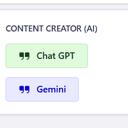
Content Creator With AI
Create Content With Open AI & Gemini
Latest version
v1.1.2
released December 31, 2025
npm install ai-content-creatorCreate Content With Open AI and Gemini for Strapi (5 and later) project.
How to use?
⚙️ Plugin Install
install npm package
npm i ai-content-creator
⚙️ Plugin Configuration
To start using the plugin, add the following configuration to your Strapi project's config/plugins.js file.
This setup enables the plugin and allows you to configure API keys and specify which Content Types the AI button should appear on.
// config/plugins.js (or similar configuration file)

module.exports = ({ env }) => {
  return {
    'ai-content-creator': {
      enabled: true,
      // The 'resolve' path is typically only required when the plugin is installed locally.
      // resolve: './src/plugins/ai-content-creator',
      config: {
        openAi:{
          enabled: true,
          apiKey: env("OPEN_AI_KEY", ""), // Fetches API key from an Environment Variable
          contentList:["api::webpage.webpage"] // Specifies the Content Types where the plugin's UI should be visible
          // OR
          contentList:[] // leave it empty if you want the plugin's UI visible in all pages
        },
        gemini:{
          enabled: true,
          apiKey: env("GEMINI_AI_KEY", ""), // Fetches API key from an Environment Variable
          contentList:["api::webpage.webpage"] // Specifies the Content Types where the plugin's UI should be visible
          // OR
          contentList:[] //  leave it empty if you want the plugin's UI visible in all pages
        }
      },
    },
  }
};
Gemini :
GPT :
💖 Support This Project
Thank you for considering supporting this project! Maintaining and developing new features for open-source software takes time and effort. You can support us via the channels below:
- GitHub Sponsors: Contribute to the project's future and gain access to special perks.
- [External Platform (e.g., Ko-fi)]: Buy us a one-time "coffee" to say thanks.


💖 Desteğiniz İçin
Bu projeyi desteklediğiniz için teşekkür ederiz! Açık kaynak yazılımların bakımı ve yeni özelliklerin geliştirilmesi zaman ve çaba gerektirir. Bize destek olmak için aşağıdaki kanalları kullanabilirsiniz:

