
Blueprint
A diagram of your content types, rendered as real SVG. Blueprint draws the whole schema, content types, the components they are built from, and the dynamic zones that hold them.
Latest version
released October 28, 2026
npm install @qkix/strapi-plugin-blueprint

Blueprint for Strapi
A diagram of your content types - including the components and dynamic zones everything else leaves out.




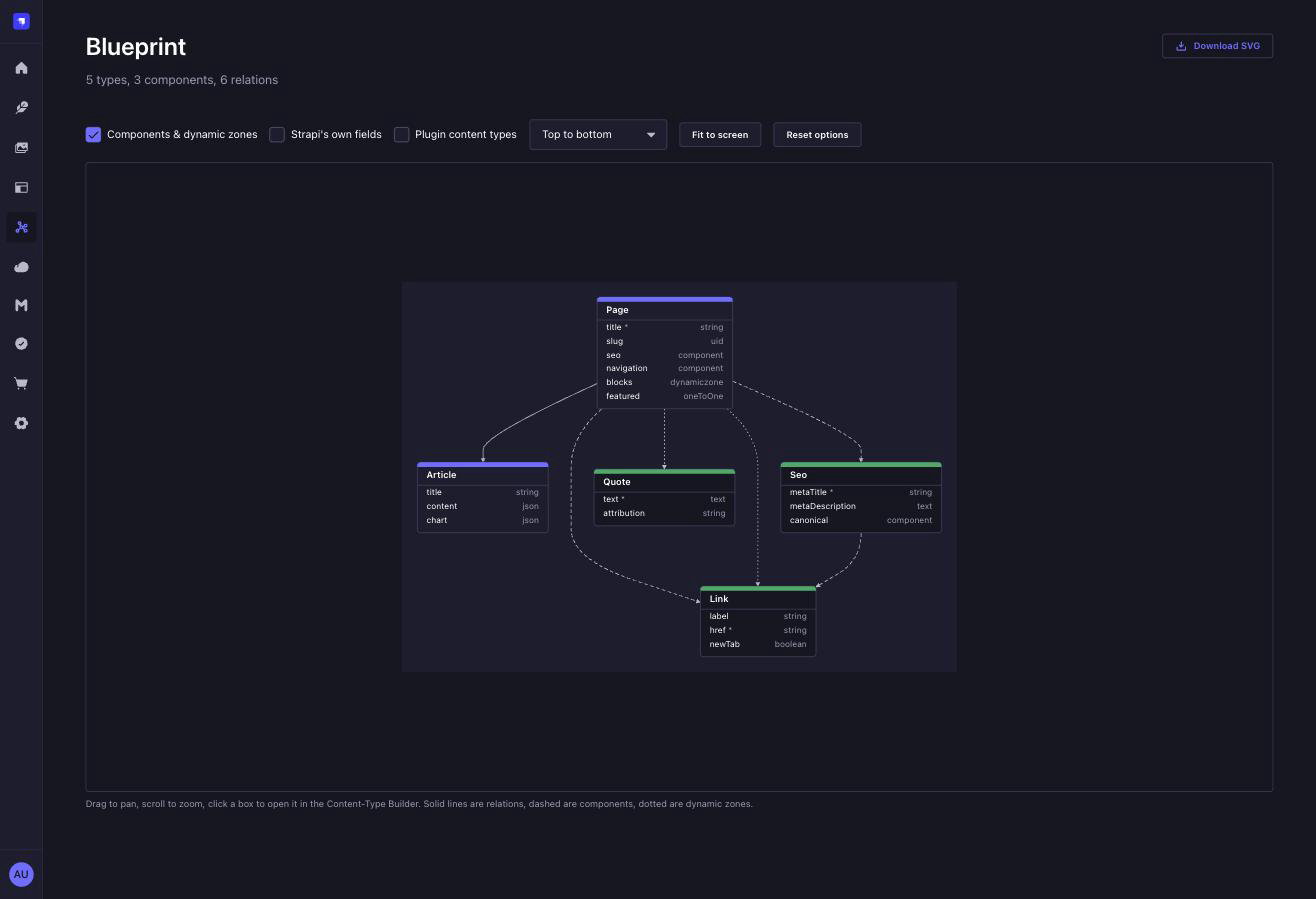
Why another one of these
Every schema diagram for Strapi draws relations only. That is fine for a schema built out of relations, and useless for the way most Strapi projects are actually built - a handful of content types, and the real structure living in components and dynamic zones. Draw relations only and a modern schema comes out as a scattering of disconnected boxes.
Blueprint draws all three, and tells them apart:
| Line | Means |
|---|---|
| solid | a relation |
| dashed | a component |
| dotted | a member of a dynamic zone |
A component is followed into whatever it contains, so a component of a component is on the picture too.
Install
npm install @qkix/strapi-plugin-blueprint// config/plugins.ts
export default {
blueprint: {
enabled: true,
},
};Then open Blueprint in the main menu. There is nothing to configure and nothing to switch on per content type.
What you get
Drag to pan, scroll to zoom, click a box to open it in the Content-Type Builder. The view fits the whole diagram when it opens and whenever what is drawn changes.
Boxes that have nowhere to go do not pretend otherwise: a plugin's internal
tables - Rewind's versions, upload's folders, anything under admin:: - belong
on the diagram because they are part of the schema, but the Content-Type Builder
has no page for them, so they take no pointer and no hover.
Toggles, remembered between visits: components and dynamic zones, Strapi's
own createdAt-style fields, and the content types belonging to Strapi and to
other plugins. Layout runs top-to-bottom or left-to-right.
Download SVG - an actual vector, not a screenshot of one. It is a standalone document with its styles and arrowheads inline and nothing fetched from anywhere, so it works pasted into a README, opened from a downloads folder, or embedded in a docs site, and it stays sharp at any size.
Permissions
One permission, blueprint.read, under Settings → Administration panel →
Roles. There is nothing else to guard: the plugin only reads, and everything
it shows is already visible to anyone who can open the Content-Type Builder.
Drawn on the server
The diagram is laid out and rendered to SVG by the server, and the admin panel displays what it is given. Two things follow from that.
The first is that anything that can make an HTTP request can have the diagram - a docs build, a CI job, a script that commits the current schema next to your code:
GET /blueprint/diagram.svg?components=true&direction=LRThe same options as the toolbar, as query parameters: components, foreign,
defaultFields, direction (TB or LR) and exclude. GET /blueprint/graph
returns the graph as JSON if you would rather draw it yourself. Both are admin
routes, so they need an admin session.
The second is that there is no graph library in your admin panel. Panning,
zooming and clicking are about a hundred lines over an SVG. The plugins this
replaces all reached for a React canvas library, and their issue trackers are
what happened next: styled-components version errors, engine warnings, a Node
20 incompatibility. A layout algorithm on the server has no opinion about your
front end.
Configuration
| Option | Default | What it does |
|---|---|---|
exclude | [] | Uids never to draw, whatever the toolbar says |
blueprint: {
  enabled: true,
  config: {
    exclude: ['api::import-log.import-log'],
  },
},
The toolbar can hide things too. The difference is that this survives a reload and applies to the API as well - it is the answer to "this never belongs on the picture", not to "not right now".
Known limitations
Boxes stop at twelve fields and count the rest as +n more. Strapi's own
File has fifteen, and one box four times the height of its neighbours turns a
diagram into a wall. The full list is a click away in the Content-Type Builder.
Layout is automatic, and cannot be nudged. Dragging a box to a better spot and having it stay there is a real request on the plugins this replaces, and it is not built yet.
Polymorphic relations are not drawn. A morphToMany has no single target to
point at, so there is no honest line to draw for it. The field is still listed on
its box.
Roadmap
What is worth building next, what is deliberately not planned, and why: ROADMAP.md.
License
MIT © qkix

