
Converter Studio
By tariksucu
Convert HEIC and RAW photos to JPG, videos to MP4 and documents to PDF as they are uploaded.
Latest version
released November 23, 2026
npm install strapi-plugin-converter-studioConverter Studio for Strapi
Convert the uploads that Strapi and browsers cannot use well, as they are uploaded: iPhone photos (HEIC) and camera RAW photos become JPG, MOV and other videos become MP4, and, if you want, documents become PDF and audio becomes MP3. The work is done by Converter Studio through its API, so nothing has to be installed on your server: no ImageMagick with HEIC support, no FFmpeg, no LibreOffice.
Why
- HEIC and RAW photos from phones and cameras cannot be shown by Chrome, Firefox or Edge. Strapi's image library (sharp) leaves HEIC unprocessed: no thumbnail in the Media Library, no width and height, no responsive formats. RAW photos may not even upload (Strapi 5.63 answered our DNG test file with a server error). TIFF does not show in browsers either, and BMP is not processed.
- Videos recorded on phones (MOV, often HEVC) and older formats (AVI, MKV, WMV, FLV, 3GP) do not play in every browser. MP4 (H.264) does.
The plugin converts such files before Strapi stores them, so Strapi treats the converted file like any other upload: it optimises it, makes the thumbnail and the responsive formats, and your frontend gets a JPG or an MP4.
Features
- On upload: the Media Library, media fields, and (if you turn it on) the Content API and
GraphQL. The file is stored under its new name,
IMG_1234.HEIC→IMG_1234.jpg. - Rules you choose: photos (HEIC, CR2, NEF, ARW, DNG, TIFF, BMP) to JPG or WebP, with quality, maximum size and whether to keep the camera details and GPS location (removed by default); videos (MOV, AVI, MKV, WMV, FLV, 3GP, WebM) to MP4 with a maximum frame height; documents (Word, PowerPoint, Excel, OpenDocument, RTF) to PDF; audio (WAV, AIFF, FLAC, WMA) to MP3. Documents and audio are off by default.
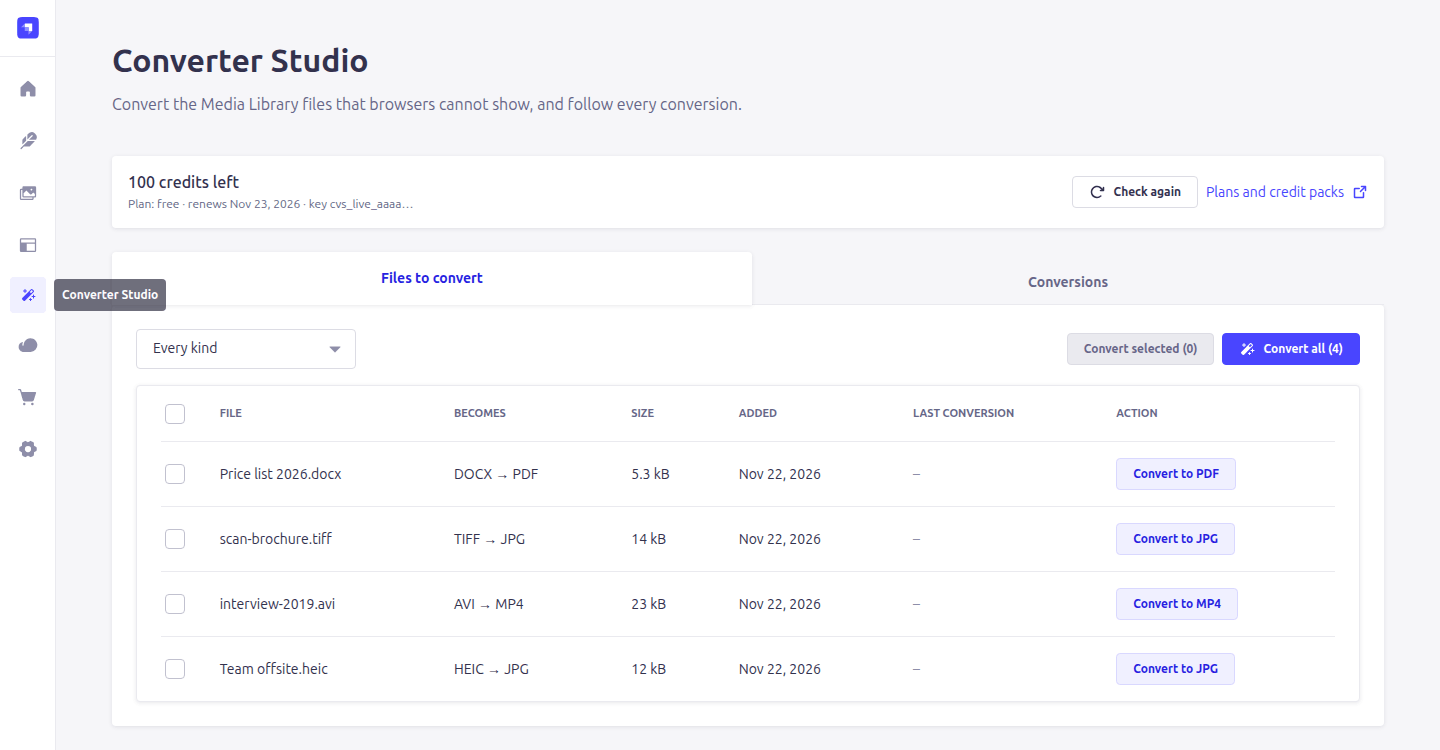
- Files already in the Media Library: the Converter Studio page lists the files in those formats. Convert one, a selection or all of them. The file keeps its id, so every entry that uses it shows the converted file; the original is kept in the folder "Converter Studio originals" (a setting).
- Long conversions never hold an upload: if a conversion takes longer than the upload wait (60 seconds by default), or the file is larger than 100 MB, the original is stored at once and replaced by the converted file when it is ready, in the background.
- Credit control: a conversion that would cost more than your limit (20 credits by default) waits for your approval and costs nothing until then. When the account runs out of credits, conversions pause until they renew, and uploads are stored as they are (or refused with the reason, if you prefer). Every conversion, its cost and any failure are listed on the Converter Studio page, where failed ones can be retried.
- Uploads made by code are never converted (imports, seeds, migrations), so installing the plugin never spends credits on its own.
- Its own permissions, admin routes only, no runtime dependencies.
Requirements
- Strapi 5 (tested on 5.31 and 5.63) and Node.js 20 or later.
- A Converter Studio account and an API key: create one at converter.studio → Account → API keys. Free accounts get 13 credits a day. A photo, a document or an audio file costs 1 credit; a video is priced by its length and frame size. See pricing.
Installation
npm install strapi-plugin-converter-studio
# or: yarn add strapi-plugin-converter-studio
npm run build      # rebuild the admin panel
npm run develop    # or restart your server
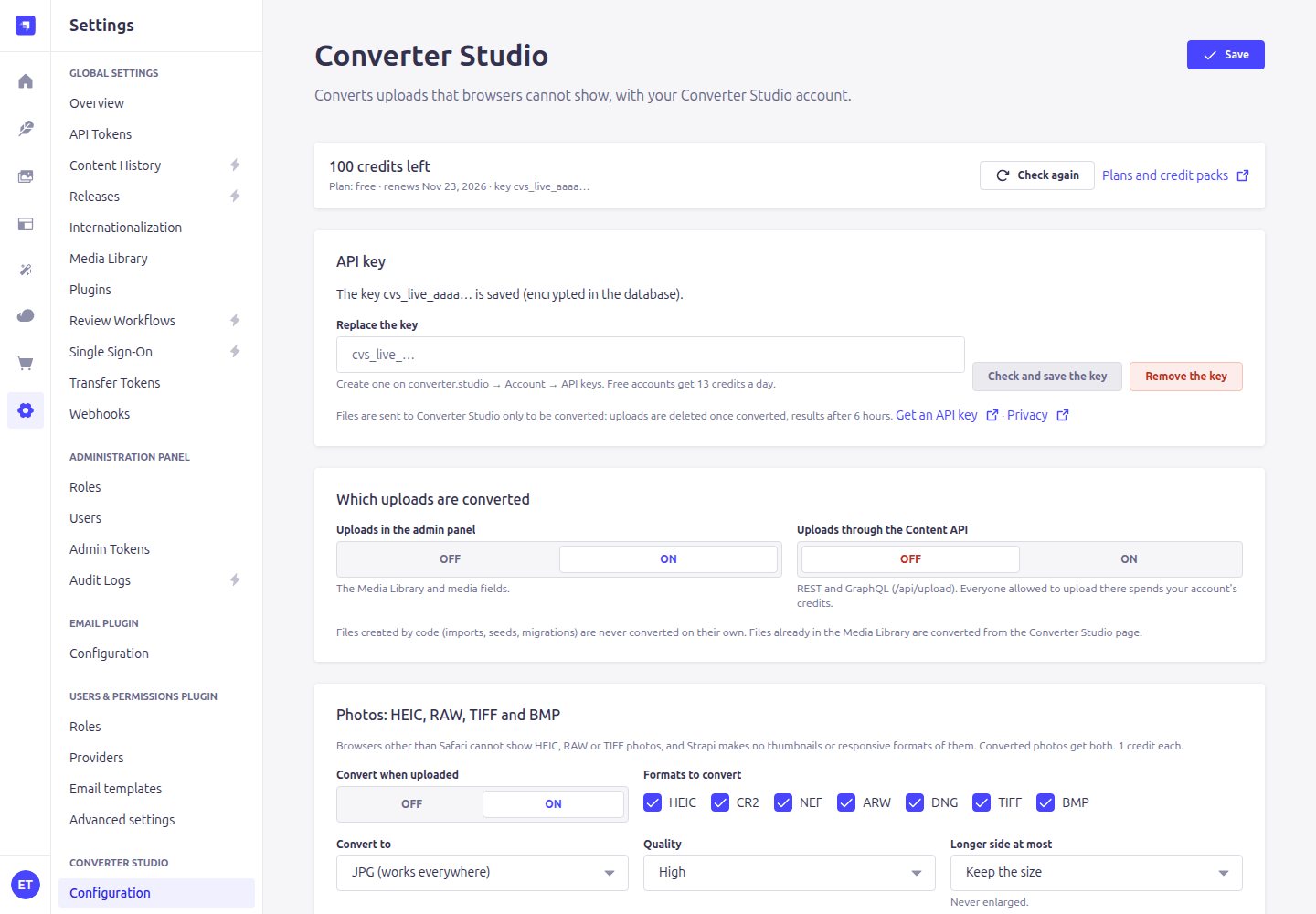
Strapi enables installed plugins on its own. Then open Settings → Converter Studio → Configuration, paste your API key and save: the plugin checks it with Converter Studio before saving it.
API key in the environment (optional)
Instead of typing the key on the settings page, you can give it in config/plugins.ts. It then
wins over a saved key, and the settings page shows only its first characters.
export default ({ env }) => ({
  'converter-studio': {
    config: {
      apiKey: env('CONVERTER_STUDIO_API_KEY'),
    },
  },
});
A key typed on the settings page is stored in Strapi's database encrypted (AES-256-GCM) with your
app's ENCRYPTION_KEY (or, if the app has none, its first APP_KEYS entry). If that secret
changes, enter the key again. The key is never shown again, never logged, and only sent to
Converter Studio's API.
Settings
| Setting | Default | What it does |
|---|---|---|
| Uploads in the admin panel | On | Convert files uploaded in the Media Library and media fields. |
| Uploads through the Content API | Off | Convert files uploaded to /api/upload (REST and GraphQL). Everyone allowed to upload there spends your credits. |
| Photos, Videos, Documents, Audio | Photos and videos on | Per rule: convert on upload, which formats, the target and its options. |
| Credits a file may cost | 20 | A dearer conversion waits for approval on the Converter Studio page. |
| Seconds an upload waits for its conversion | 60 | After that the original is stored and replaced once the conversion is done. |
| When an upload cannot be converted | Store the original | Or refuse the upload, with the reason (no credits, file too large for the plan…). |
| Keep originals | Library files: on; uploads: off | Keep the original as its own file in the folder "Converter Studio originals". |
Permissions
Settings → Administration panel → Roles → Plugins → Converter Studio:
- See conversions and the files to convert — the Converter Studio page.
- Convert files, approve and retry conversions — these spend credits.
- Read the settings and Change the settings and the API key.
Super Admins have all of them.
Good to know
- Upload restrictions: Strapi checks a file's type before the plugin sees it. If you limit
upload types with
plugin::upload.security.allowedTypes, allow the formats you want converted (for exampleimage/heic,video/quicktime). - Size limit: the converted file must also fit within
plugin::upload.sizeLimit. - Replacing a file in the Media Library with a HEIC converts it too. Strapi keeps the URL (and extension) of a replaced file, as it does for any replacement.
- Several servers: each conversion is claimed by one server, so servers sharing a database do not convert a file twice.
- Uninstalling: converted files stay as they are. The plugin's table
(
converter_studio_conversions) and settings can be deleted afterwards.
Privacy
The plugin sends the files it converts (with their names) to Converter Studio, and nothing else
about your site or its users; its requests carry the User-Agent
ConverterStudio-Strapi/<plugin version> Strapi/<Strapi version>. Converter Studio deletes each upload once it is converted and each
result after 6 hours. No request is made before an API key is set. See the
privacy policy and terms.
The plugin collects no usage data.
Support
Report problems at github.com/tariksucu/strapi-plugin-converter-studio/issues or write to support@converter.studio.
Development and releases
npm ci
npm test             # unit tests (no network)
npm run typecheck
npm run build && npm run verify
Releases are published to npm by this repository's GitHub Actions workflow
(.github/workflows/publish.yml) when a version tag is pushed, with an
npm provenance statement: the package
page on npm shows the commit and the workflow each version was built from.
License
MIT