Replaces the default Strapi WYSIWYG editor with a customized build of CKEditor 5 packed with useful plugins. (Unofficial integration)
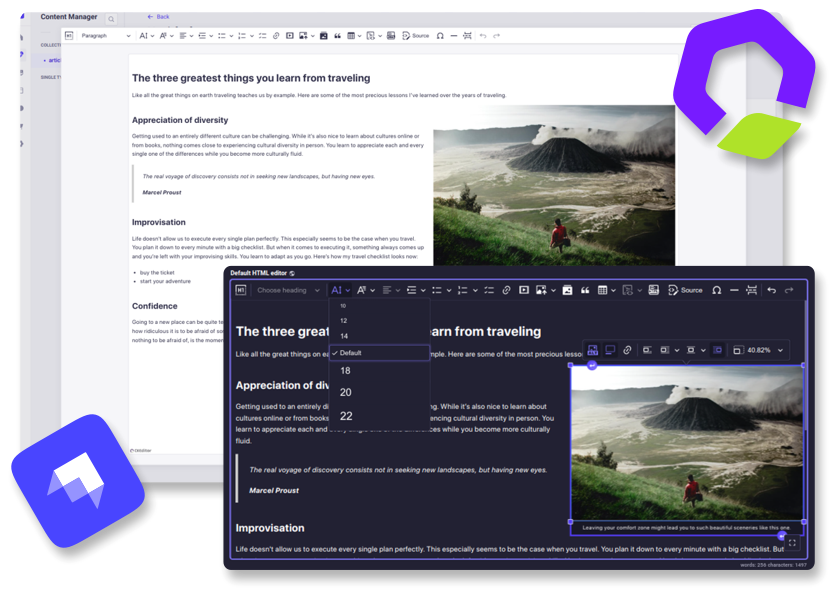
Strapi ➕ CKEditor
Integrates CKEditor 5 into your Strapi project as a fully customizable custom field. (Community edition)
👋 Get Started
✨ Features
- Extensive configuration
- Media Library integration
- Dark theme support
- Fullscreen expansion
- Responsive images support
- Automatic UI translations
- i18n support
- Self-Hosted

🔧 Installation
Strapi v5:
Add the package to your Strapi application:
yarn add @_sh/strapi-plugin-ckeditor
Then, build the app:
Strapi v4:
Version 3 of the plugin will remain available for Strapi v4 until March 2026.
Refer to the v3 installation guide
for setup instructions.
Note: Version 3 receives only essential bug fixes. The configuration process and available
features in version 3 differ significantly from the latest plugin versions.
✍️ Usage
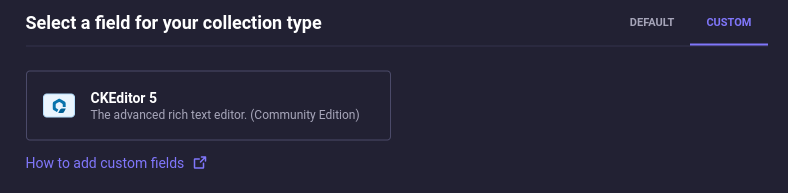
The field can be found in the Content-Type Builder under the CUSTOM tab:
Presets
A preset is a set of settings that define the editor's features and appearance. You
can specify a dedicated preset for each field. The available presets can be customized through the
configuration.
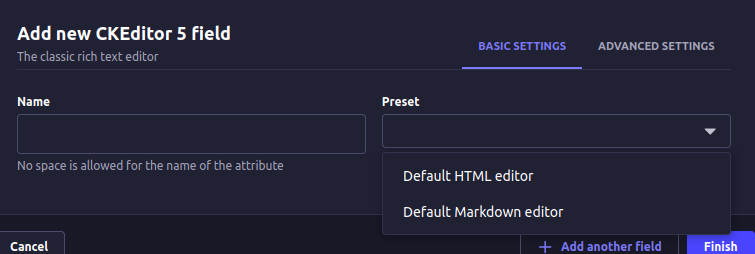
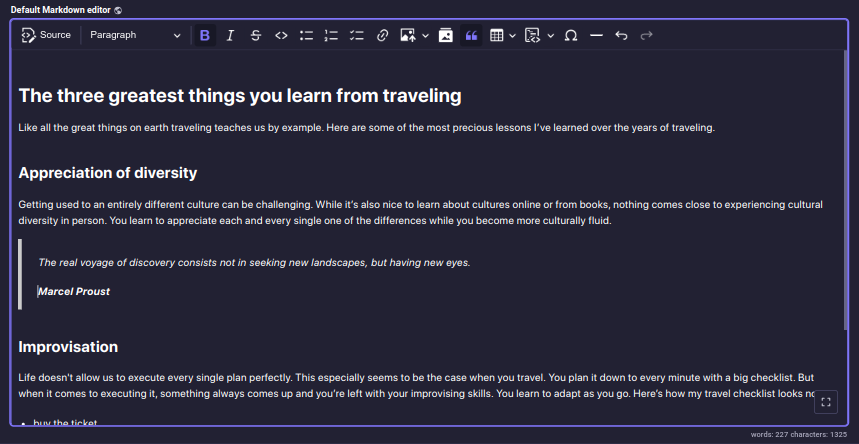
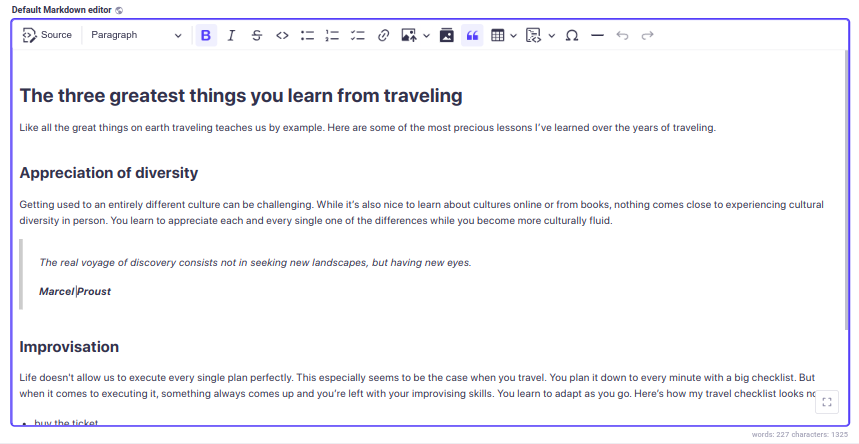
The plugin provides two presets out of the box: Default HTML editor and Default Markdown editor,
each has different output format: HTML and Markdown, respectively. Both presets include
an extensive set of non-premium CKEditor plugins.
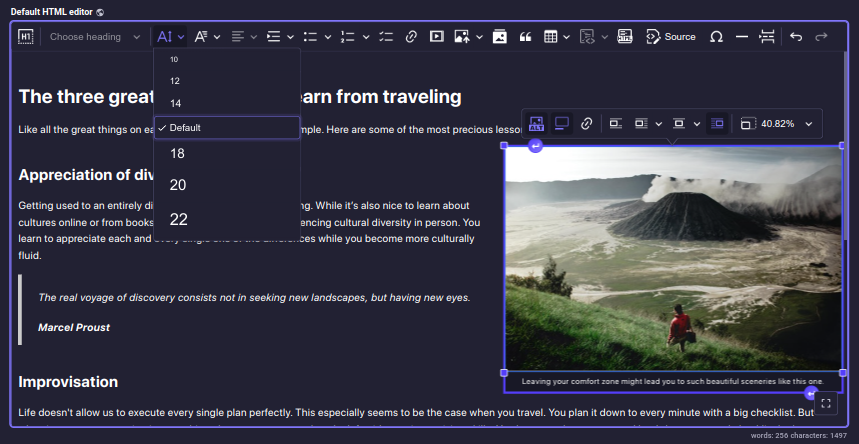
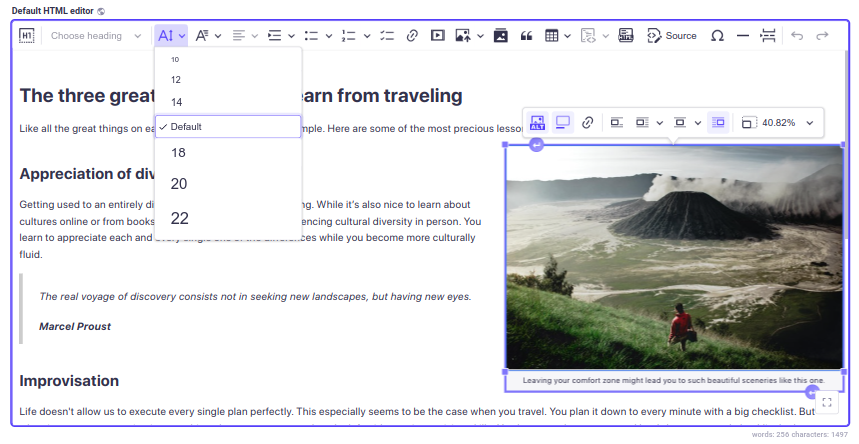
Default HTML editor:
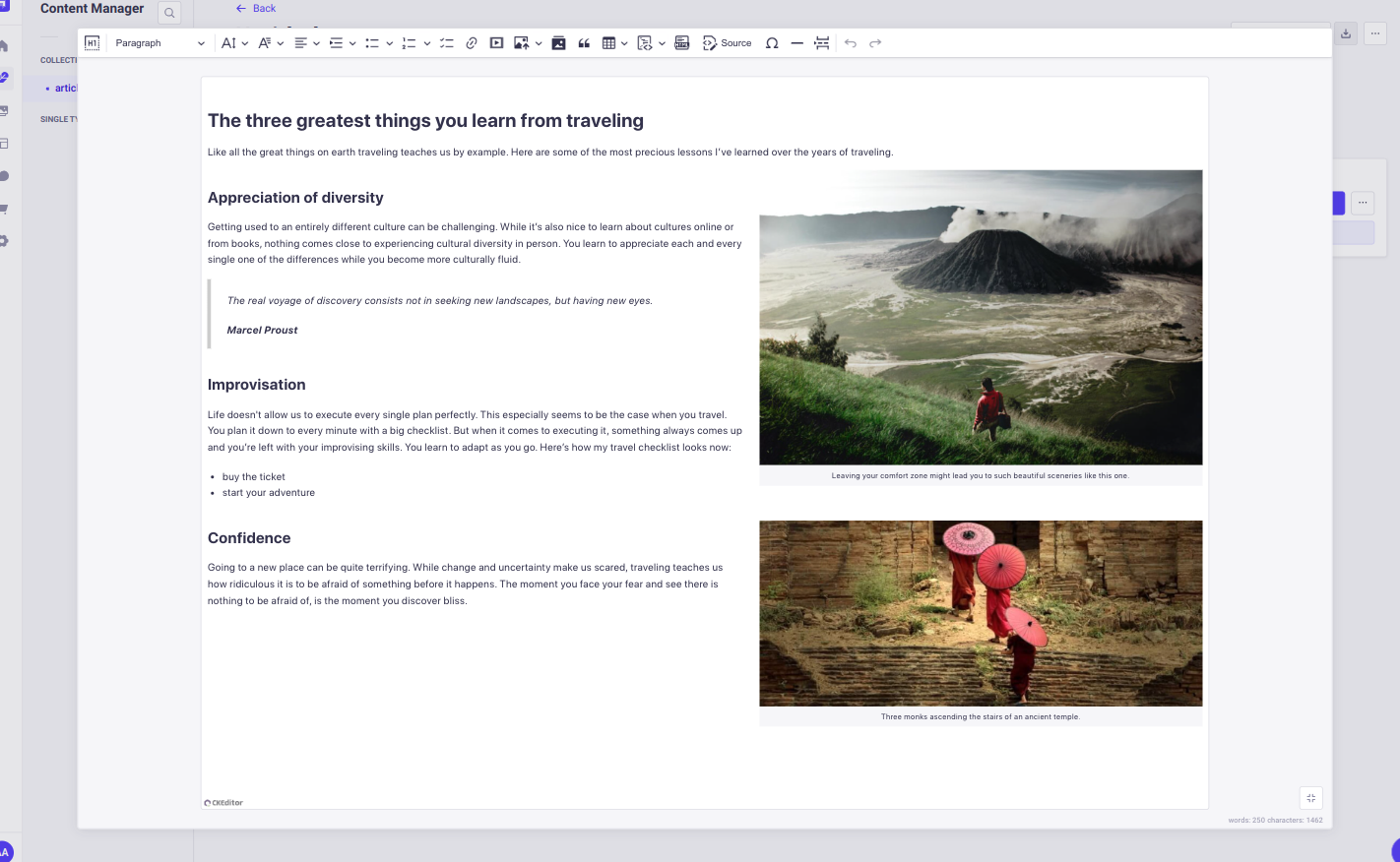
Default Markdown editor:
Responsive images
The plugin generates srcset attribute for inserted images if the image has any formats other than thumbnail.
UI language: If you don't specify the UI language in the editor configuration, the plugin will
default to the Strapi admin's preferred language. If no preference is set, English will be used as a fallback.
Content language: i18n for the editor's content language can be enabled by checking the
Enable localization for this field option in the Advanced Settings tab.
💡 It is important to use the content styles on the publishing side of your application. Otherwise, the content will look different in the editor and for your end users. Follow the documentation.
To display content from external sources, such as images or videos, in your admin panel,
you need to configure your middlewares.js file.
Check the documentation for details.
⚙️ Configuration
The plugin configuration must be defined on the front-end.
The plugin provides a set of functions that allow you to modify the plugin's configuration:
setPluginConfig(config);
getPluginPresets();
getPluginTheme();
setPluginConfig
The function, accepts a plugin configuration (PluginConfig) that can include an array of presets
and a theme object:
import { setPluginConfig } from '@_sh/strapi-plugin-ckeditor';

function setPluginConfig(pluginConfig: {
  presets: Preset[] | undefined;
  theme: Theme | undefined;
}): void;
Key points:
- The function must be invoked before the admin panel's bootstrap lifecycle function. The general recommendation is to call it inside the admin panel's register lifecycle function.
- Provided properties will overwrite the default configuration values.
- The configuration becomes immutable after the first invocation, preventing further modifications.
Plugin configuration object includes optional presets and theme properties:
type PluginConfig = {
presets?: Preset[];
theme?: Theme;
};
presets is an array of objects of type Preset. Each preset includes the following properties:
type Preset = {
name: string;
description: string;
editorConfig: EditorConfig;
styles?: EditorStyles;
};
theme object defines a plugin CSS styles applied to every editor instance. It includes the
following properties:
type Theme = {
common?: EditorStyles;
light?: EditorStyles;
dark?: EditorStyles;
additional?: EditorStyles;
};
export type EditorStyles = string | Interpolation<object>[];
getPluginPresets
function getPluginPresets(): {
  [key: string]: Preset;
};
Returns presets object.
- Each property name must match the corresponding preset's name.
- To extend or modify the options visible in the admin panel's content manager,
changes must be made before the admin panel's bootstrap lifecycle function.
getPluginTheme
function getPluginTheme(): Theme;
Returns theme object.
Default presets and theme
To simplify the process of defining a new preset, the plugin exports default presets and
a default theme, which can be used as a base in custom configurations:
import {
  defaultTheme,
  defaultHtmlPreset,
  defaultMarkdownPreset,
} from '@_sh/strapi-plugin-ckeditor';
Integration with Strapi's Media Library
To integrate CKEditor with the Strapi's Media Library, the plugin provides two CKEditor plugins
that can be included in your presets without additional configuration:
import { StrapiMediaLib, StrapiUploadAdapter } from '@_sh/strapi-plugin-ckeditor';
Available type definitions
The following type definitions are available for use:
import type {
  PluginConfig,
  Preset,
  EditorConfig,
  Theme,
  EditorStyles,
} from '@_sh/strapi-plugin-ckeditor';
Type definitions
export type PluginConfig = {
presets?: Preset[];
theme?: Theme;
};
export type Preset = {
name: string;
description: string;
styles?: EditorStyles;
editorConfig: EditorConfig;
};
export type EditorConfig = CKE5EditorConfig;
export type Theme = {
common?: EditorStyles;
light?: EditorStyles;
dark?: EditorStyles;
additional?: EditorStyles;
};
export type EditorStyles = string | Interpolation<object>[];
Configuration examples:
Setting a new set of presets [JS]
// src/admin/app.js
import {
Bold,
Italic,
Essentials,
Heading,
Image,
ImageCaption,
ImageStyle,
ImageToolbar,
ImageUpload,
Link,
List,
Paragraph,
} from 'ckeditor5';
import { setPluginConfig, StrapiMediaLib, StrapiUploadAdapter } from '@_sh/strapi-plugin-ckeditor';
const myCustomPreset = {
name: 'myCustomPreset',
description: 'myCustomPreset description',
editorConfig: {
licenseKey: 'GPL',
plugins: [
Bold,
Italic,
Essentials,
Heading,
Image,
ImageCaption,
ImageStyle,
ImageToolbar,
ImageUpload,
Link,
List,
Paragraph,
StrapiMediaLib,
StrapiUploadAdapter,
],
toolbar: [
'heading',
'|',
'bold',
'italic',
'link',
'bulletedList',
'numberedList',
'|',
'strapiMediaLib',
'|',
'undo',
'redo',
],
},
};
const myConfig = {
presets: [myCustomPreset],
};
export default {
register() {
setPluginConfig(myConfig);
},
};
Setting a new set of presets [TS]
// src/admin/app.ts
import {
Bold,
Italic,
Essentials,
Heading,
Image,
ImageCaption,
ImageStyle,
ImageToolbar,
ImageUpload,
Link,
List,
Paragraph,
} from 'ckeditor5';
import {
type PluginConfig,
type Preset,
setPluginConfig,
StrapiMediaLib,
StrapiUploadAdapter,
} from '@_sh/strapi-plugin-ckeditor';
const myCustomPreset: Preset = {
name: 'myCustomPreset',
description: 'myCustomPreset description',
editorConfig: {
licenseKey: 'GPL',
plugins: [
Bold,
Italic,
Essentials,
Heading,
Image,
ImageCaption,
ImageStyle,
ImageToolbar,
ImageUpload,
Link,
List,
Paragraph,
StrapiMediaLib,
StrapiUploadAdapter,
],
toolbar: [
'heading',
'|',
'bold',
'italic',
'link',
'bulletedList',
'numberedList',
'|',
'strapiMediaLib',
'|',
'undo',
'redo',
],
},
};
const myConfig: PluginConfig = {
presets: [myCustomPreset],
};
export default {
register() {
setPluginConfig(myConfig);
},
};
Default presets modification using setPluginConfig [TS]
// src/admin/app.ts

import { css } from 'styled-components';

import {
  type PluginConfig,
  type Preset,
  setPluginConfig,
  defaultHtmlPreset,
  defaultMarkdownPreset,
} from '@_sh/strapi-plugin-ckeditor';

const defaultHtml: Preset = {
  ...defaultHtmlPreset,
  description: 'Modified default HTML editor',
  styles: `
    .ck {
      color: red;
    }
  `,
  editorConfig: {
    ...defaultHtmlPreset.editorConfig,
    placeholder: 'Modified default HTML editor',
    toolbar: [
      'heading',
      '|',
      'bold',
      'italic',
      'link',
      'bulletedList',
      'numberedList',
      '|',
      'strapiMediaLib',
      'insertTable',
      '|',
      'undo',
      'redo',
    ],
  },
};

const defaultMarkdown: Preset = {
  ...defaultMarkdownPreset,
  description: 'Modified default Markdown editor',
  styles: css`
    .ck {
      --ck-editor-max-width: 1500px;
      --ck-editor-min-height: 700px;
      --ck-editor-max-height: 700px;
    }

    .ck.ck-editor__main {
      border: 3px dashed ${({ theme }) => theme.colors.warning500};
    }
  `,
};

const myConfig: PluginConfig = {
  presets: [defaultHtml, defaultMarkdown],
};

export default {
  register() {
    setPluginConfig(myConfig);
  },
};
Default presets modification using getPluginPresets [TS]
// src/admin/app.ts

import { css } from 'styled-components';
import { getPluginPresets } from '@_sh/strapi-plugin-ckeditor';

export default {
  register() {
    const presets = getPluginPresets();

    presets.defaultHtml.styles = css`
      .ck {
        color: red;
      }
    `;

    presets.defaultHtml.editorConfig = {
      ...presets.defaultHtml.editorConfig,
      placeholder: 'Modified default HTML editor',
      toolbar: [
        'heading',
        '|',
        'bold',
        'italic',
        'link',
        'bulletedList',
        'numberedList',
        '|',
        'strapiMediaLib',
        'insertTable',
        '|',
        'undo',
        'redo',
      ],
    };

    presets.defaultMarkdown = {
      ...presets.defaultMarkdown,
      description: 'Modified default Markdown editor',
      styles: css`
        .ck {
          --ck-editor-max-width: 1500px;
          --ck-editor-min-height: 700px;
          --ck-editor-max-height: 700px;
        }

        .ck.ck-editor__main {
          border: 3px dashed ${({ theme }) => theme.colors.warning500};
        }
      `,
    };
  },
};
Modifying theme using setPluginConfig [TS]
// src/admin/app.ts

import { css } from 'styled-components';

import { type PluginConfig, setPluginConfig, defaultTheme } from '@_sh/strapi-plugin-ckeditor';

const myConfig: PluginConfig = {
  theme: {
    ...defaultTheme,
    additional: css`
      .ck {
        --ck-editor-max-width: 1500px;
        --ck-editor-min-height: 700px;
        --ck-editor-max-height: 700px;
      }

      .ck.ck-editor__main {
        border: 3px dashed ${({ theme }) => theme.colors.warning500};
      }
    `,
  },
};

export default {
  register() {
    setPluginConfig(myConfig);
  },
};
Modifying theme using getPluginTheme [TS]
// src/admin/app.ts

import { css } from 'styled-components';
import { getPluginTheme } from '@_sh/strapi-plugin-ckeditor';

export default {
  register() {
    const theme = getPluginTheme();

    theme.additional = css`
      .ck {
        --ck-editor-max-width: 1500px;
        --ck-editor-min-height: 700px;
        --ck-editor-max-height: 700px;
      }

      .ck.ck-editor__main {
        border: 3px dashed ${({ theme }) => theme.colors.warning500};
      }
    `;
  },
};
Adding Timestamp plugin [JS]
// src/admin/app.js

import { Plugin, ButtonView } from 'ckeditor5';

import { setPluginConfig, defaultHtmlPreset } from '@_sh/strapi-plugin-ckeditor';

class Timestamp extends Plugin {
  init() {
    const editor = this.editor;
    editor.ui.componentFactory.add('timestamp', () => {
      const button = new ButtonView();
      button.set({
        label: 'timestamp',
        withText: true,
      });
      button.on('execute', () => {
        const now = new Date();
        editor.model.change(writer => {
          editor.model.insertContent(writer.createText(now.toString()));
        });
      });
      return button;
    });
  }
}

export default {
  register() {
    defaultHtmlPreset.editorConfig.plugins.push(Timestamp);
    defaultHtmlPreset.editorConfig.toolbar.unshift('timestamp');
    setPluginConfig({ presets: [defaultHtmlPreset] });
  },
};
📂 Default HTML preset: admin/src/config/htmlPreset.ts
📂 Default Markdown preset: admin/src/config/markdownPreset.ts
📂 Default theme: admin/src/theme
📌 It is highly recommended to explore the official CKEditor5 documentation.
🛠 Contributing
Feel free to fork the repository
and open a pull request, any help is appreciated.
Follow these steps to set up a plugin development environment. Note that developing the plugin
requires Node >= 22, even though the published package supports Node 20, because the Strapi
plugin SDK's toolchain no longer runs on Node 20.
-
Clone the repository.
-
Read the Strapi Plugin SDK documentation.
-
Navigate to the cloned plugin folder and install dependencies, run:
-
Link the plugin to your project:
- In the plugin folder, run:
- Open a new terminal, navigate to your Strapi project directory, and run:
yarn dlx yalc add --link @_sh/strapi-plugin-ckeditor && yarn install
-
Rebuild the project and start the server:
✈️ Migration
To upgrade to the latest version, follow the dedicated migration guide
for detailed instructions.
⚠️ Requirements
v8.x.x
Strapi >= 5.0.0
Node >= 20.0.0 <= 26.x.x
v5.x.x - v7.x.x
Strapi >= 5.0.0
Node >= 20.0.0 <= 24.x.x
v3.x.x
Strapi >= 4.13.0 < 5.0.0
Node >= 18.0.0 <= 20.x.x
🩺 Troubleshooting
Blank admin panel on Strapi 5.51.x
Strapi 5.51.0 added a heuristic that removes plugins like this one from Vite's dependency
pre-bundling. Without pre-bundling, CommonJS packages in the plugin's dependency tree are served
to the browser as-is, which native ESM cannot load. The admin panel renders a blank page and the
console shows an error such as:
The requested module '/admin/node_modules/property-expr/index.js'
does not provide an export named 'getter'
This only affects strapi develop. A production build made with strapi build is not affected,
because it does not use dependency pre-bundling.
The fix is tracked upstream in strapi/strapi#27136
and merged in strapi/strapi#27264. Until it lands in
a release, put the plugin back on the pre-bundling path from your Strapi project:
// src/admin/vite.config.ts
import type { UserConfig } from 'vite';

const KEEP_PREBUNDLED = ['@_sh/strapi-plugin-ckeditor', '@ckeditor/ckeditor5-react'];

export default (config: UserConfig) => {
  config.optimizeDeps = config.optimizeDeps ?? {};
  config.optimizeDeps.exclude = (config.optimizeDeps.exclude ?? []).filter(
    dep => !KEEP_PREBUNDLED.includes(dep)
  );

  return config;
};
Then clear the caches and restart:
rm -rf .strapi node_modules/.strapi
Both package names are required. With only the first one the admin panel loads but the editor
does not, failing with Failed to resolve import "@ckeditor/ckeditor5-react".
Delete this file once you upgrade to a Strapi release that contains the upstream fix.