
Brevo Template Sender
Send HTML emails via Brevo: configure by content-type and event (Create, Update, Delete, Publish, Unpublish), HTML or Brevo templates, and on-demand send API.
Latest version
released March 13, 2026
npm install strapi-plugin-brevo-template-sender
Strapi Brevo Template Sender
Strapi (v5) plugin to send HTML emails via Brevo: configure by content-type and event (Create, Update, Delete, Publish, Unpublish), HTML or Brevo templates, and on-demand send API.

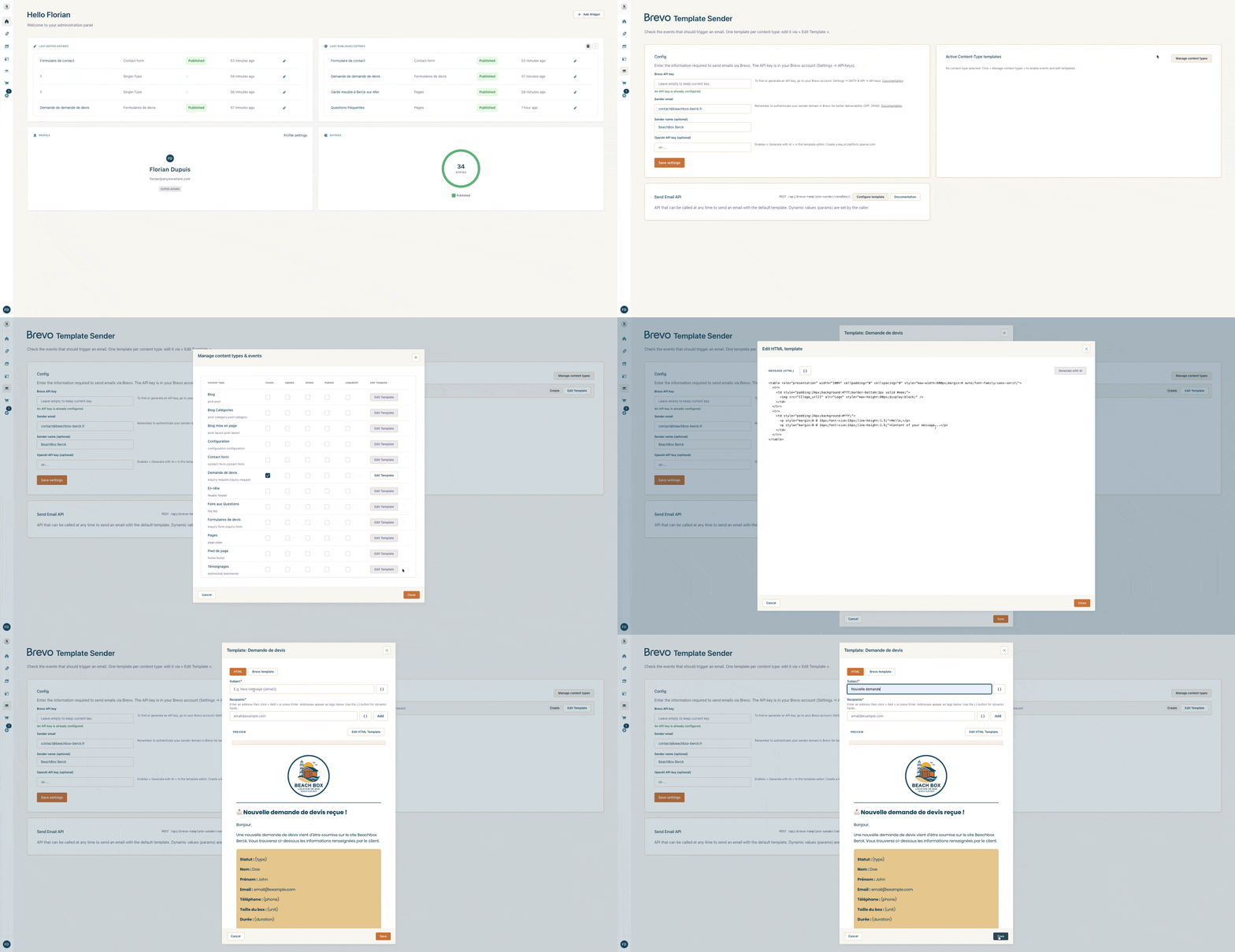
Features
- Brevo config: API key, sender (email / name), optional OpenAI API key for AI-generated templates
- Templates per content-type: one template (subject + HTML or Brevo template) per content-type, tied to Create, Update, Delete, Publish, Unpublish events
- Template modes: HTML (subject + HTML in Strapi) or Brevo template (ID of template created in Brevo)
- Send API: endpoint
POST /api/brevo-template-sender/sendwith body{ params: { ... } }only. Template and recipients from Strapi config. - AI generation: “Generate with AI” button in the template editor (requires OpenAI key in config or
OPENAI_API_KEY)
Installation
Requirements
- Strapi v5
- Brevo account (API key)
- Optional: OpenAI key for “Generate with AI”
Enable the plugin in Strapi
In config/plugins.ts:
Local install (plugin inside your Strapi project). Config is optional: by default the plugin uses its own content-type plugin::brevo-template-sender.email-template and logoUrl from STRAPI_LOGO_URL (or empty).
export default ({ env }) => ({
  "brevo-template-sender": {
    enabled: true,
    resolve: "./src/plugins/strapi-plugin-brevo-template-sender",
    // Optional config: only add when overriding defaults
    // config: {
    //   templateContentType: "api::email-template.email-template", // project custom content-type
    //   logoUrl: env("STRAPI_LOGO_URL", ""),                      // or leave default (env)
    //   // OpenAI: set OPENAI_API_KEY in .env or in plugin Config (admin) for "Generate with AI"
    // },
  },
});
To use an Email Template content-type defined in your project (e.g. api::email-template.email-template) or to set the logo URL in config instead of an env variable, uncomment and fill in config.
Rebuild Strapi
npm run build
npm run develop
or with yarn:
yarn build
yarn develop
Usage
1) Configuration page (admin)
In the Brevo Template Sender menu:
- Config: Brevo API key, sender email and name, OpenAI key (optional)
- Active Content-Type templates: “Manage content types” to enable events per content-type, “Edit Template” for subject / HTML / recipients
- Send Email API: default template for the
sendendpoint, configurable via “Configure template”
2) Template editor (Edit Template)
For each enabled content-type, “Edit Template” lets you set:
- Subject: with
{{variable}}placeholders - Message (HTML) or Brevo template: HTML mode (editor) or Brevo template ID
- Recipients: Recipients field (used by the Send API)
- Generate with AI: button to create or adapt HTML via OpenAI
3) Send API
Body: { params: { ... } } only. Template and recipients are set in Strapi (plugin → Configure template).
Example:
POST /api/brevo-template-sender/send
{
  "params": {
    "firstname": "Jean",
    "message": "Content..."
  }
}
Email Template content-type
By default the plugin uses its own content-type plugin::brevo-template-sender.email-template. If you set templateContentType (e.g. api::email-template.email-template), your project content-type must expose at least: name, code (unique), subject, html. Variables in subject and HTML use the {{variable_name}} syntax.
Template variables
- Subject and HTML:
{{variable_name}}(optional spaces). Keys inparamsreplace these placeholders. {{logo_url}}: injected automatically by the plugin (configlogoUrlorSTRAPI_LOGO_URL).
Example subject: New message: {{subject}} — HTML: <p><img src="{{logo_url}}" alt="Logo" /></p><p>From: {{email}}</p><p>{{message}}</p>
Template codes and variables are defined by your project: create the templates you need in Strapi (or in Brevo) and reference them by code or document ID when calling the API.
Preview
In the template editor, a preview on the right replaces variables with sample values (including {{logo_url}} when configured).
Technical requirements
- Brevo:
BREVO_API_KEYand sender (admin config or.env/BREVO_SENDER) - OpenAI (optional): key in Config or
OPENAI_API_KEYfor “Generate with AI” - Project uses the
@getbrevo/brevopackage
Contributors
- Florian Dupuis (dupflo)
License
MIT — see repository.

