
strapi-plugin-csv-exporter
A highly configurable Strapi plugin that allows you to export your content types as CSV files with drag-and-drop interface for column management.
Latest version
released September 14, 2026
npm install strapi-plugin-csv-exporterStrapi Plugin CSV Exporter
A highly configurable Strapi plugin that allows you to export your content types as CSV files with drag-and-drop interface for column management.


✨ Features
- Easy CSV Export: Export your Strapi collections to CSV format
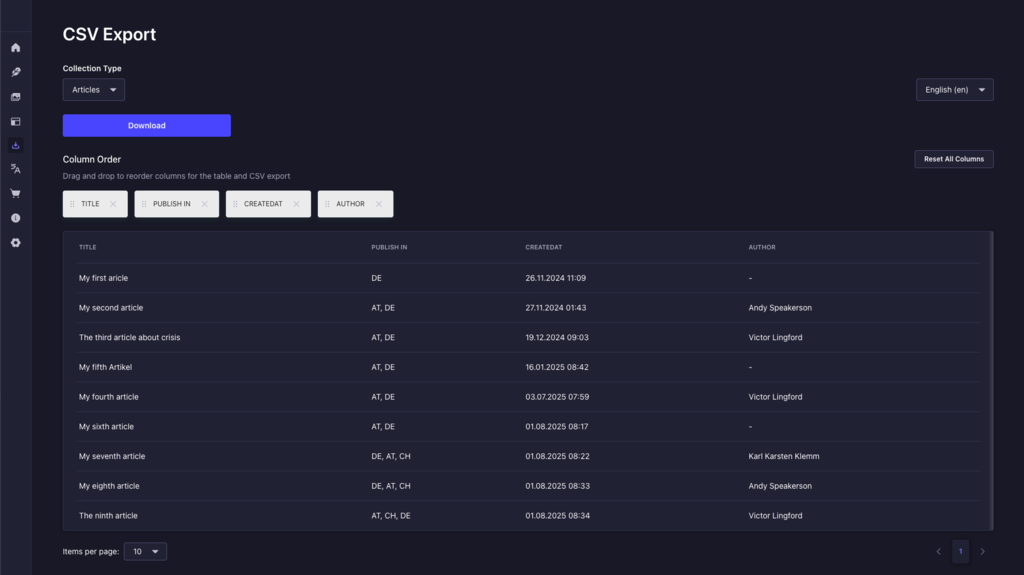
- Interactive Table Preview: View your data before export in the Admin Panel
- Flexible Configuration: Configure which content types, collumns & relations are available for export
- Drag & Drop Column Reordering: Reorder columns for both table display and CSV output in the Admin Panel
- i18n Support: Export your content types based on your configured locales
- Permissions: Enable for selected useres only and respects current user permissions per field & locale
- Custom Filtering: Apply optional filters as you would do with Strapi Document API
📦 Installation
npm install strapi-plugin-csv-exporter🚀 Quick Start
-
Install the plugin
-
Enable the plugin in your
config/plugins.ts:
module.exports = {
  'csv-exporter': {
    enabled: true,
  },
};- Create
config/csv-exporter.tsin your Strapi project:
// for strapi tsconfig
//  "module": "CommonJS",
//  "moduleResolution": "Node",
// use
//
// import type { CSVExporterPlugin } from "strapi-plugin-csv-exporter/dist/server/src";
//
// for
//  "module": "Node16",
//  "moduleResolution": "Node16",
import type { CSVExporterPlugin } from "strapi-plugin-csv-exporter/strapi-server";

module.exports = (): CSVExporterPlugin => ({
  // Content type specific configurations
  config: {
    // Configuration for articles content type
    'api::article.article': {
      // Label shown in the dropdown
      dropdownLabel: 'Published articles',

      // Columns to export
      columns: ['title', 'createdAt'],

      // Relations as column (optional)
      // A single configured column is exported under the relation's own name (e.g. "author").
      // Configuring multiple columns splits them into one cell per column (e.g. "author:name", "author:id").
      // Multiple related records are combined into comma-separated lists (e.g. "author:name": "John, Jane", "author:id": "1, 2").
      // Lists preserve record order; missing values leave empty positions.
      relation: {
        author: {
          column: ['name', 'id'],
        }
      },

      // Filters to apply to the query (optional)
      filter: {
        title: {
          $contains: 'Hello',
        },
      },

      // Status (draft or published, optional)
      status: 'published', // defaults to draft if not provided

      // Custom columns to add to the table
      customColumns: {
        'customColumnName': { // This will be used as collumn title
          // item contains the element containing all columns and relations to build a custom column
          column: (item) => `custom string result with id: ${item.id}`
        }
      }

    },
  },
  // Optional: Fields to globally ignore in exports
  ignore: [], // default
  // Optional: Exclude fields marked `private: true` in the content type schema from exports.
  // Password fields are always excluded regardless of this setting
  excludePrivateFields: false, // default
  // Optional: Global date formatting for all fields that are a valid ISO Date
  dateFormat: 'dd.MM.yyyy HH:mm', // default
  // Optional: Formatting for date-only fields
  dateOnlyFormat: 'dd.MM.yyyy', // default
  // Optional: Formatting for time-only fields
  timeFormat: 'HH:mm', // default
  // Optional: Set a *global* IANA time zone identifier or UTC offset (e.g. 'Europe/Berlin' or '+02:00'). Per default, the current timezone of the client will be used to format timestamps. If no timezone can be determined, default will be UTC+00:00)
  timeZone: '+00:00', // default
  // Optional: Protect against CSV injection by prefixing values that a spreadsheet would
  // evaluate as a formula (values starting with =, +, -, @, tab or CR) with a single quote.
  // Plain numbers (-5, +3.2) are left untouched
  escapeFormulas: true, // default
  // Optional: Prefix the file with a UTF-8 byte order mark, to not assume
  // local ANSI code page and mangle umlauts, accents and other non-ASCII characters
  bom: true, // default
  // Optional: How many rows are fetched per database round trip while exporting
  batchSize: 500, // default
  // Optional: Hard cap on exported rows. Unlimited when not set
  maxRows: undefined, // default
});-
Build and restart your Strapi application
-
Add Permission Enable your users to use the plugin in the permissions settings
🔒 Permissions
For a user to export a collection set up the following permissions:
- CSV Exporter → Usage permission, which grants access to the plugin itself
- Content Manager read permissions are applied like in the list and edit views
🖥️ Usage
Accessing the Plugin
- Navigate to CSV Exporter in your side bar panel
- The plugin interface will load with your configured content types in the dropdown
Using the Interface
1. Select Content Type
- Use the dropdown to select which content type to export
- The table shows a preview of your data
2. Manage Columns
Reorder Columns:
- Drag and drop column items to reorder them
- The table and CSV export will use this new order
Delete Columns:
- Click the ❌ button on any column to remove it
- Deleted columns won't appear in the table or CSV export
3. Download CSV
- Click the "Download" button to generate and download your CSV
- Format:
{content-type}-export-{dd_MM_yyyy_HH_mm}.csv
📄 License
This project is licensed under the MIT License — see the LICENSE file for details.
If you find this plugin helpful, please consider:
- ⭐ Starring the repository
- 🐛 Reporting bugs and issues
- 🤝 Contributing to the project
- 💡 Suggesting new features
- 📣 Sharing with others who might benefit

