
Narration
By IB Solutions
Text-to-speech (TTS) for Strapi 5. Turn any entry into an MP3 narration without leaving the CMS. Pick a voice, click Generate, and the plugin synthesizes the entry's text, drops the audio into the Media Library, and links the voice and file back to the entry.
Latest version
released May 18, 2026
npm install strapi-plugin-narration
Narration for Strapi 5


Package: strapi-plugin-narration · Repository: github.com/IBSolutions-dev/strapi-plugin-narration
Turn any Strapi entry into a listenable MP3 without leaving the CMS. Pick a voice, click Generate narration, and the plugin synthesizes the entry's text, drops the audio into the Media Library, and links the voice and file back to the entry.
Useful for podcast versions of articles, audio summaries on blog posts, accessibility narration, and audio descriptions for visitors who prefer to listen. Anywhere reading aloud belongs in the editorial workflow rather than a separate production track.
Beta: This plugin is in public beta and still being tested ahead of a stable
1.0.0release.
What it looks like
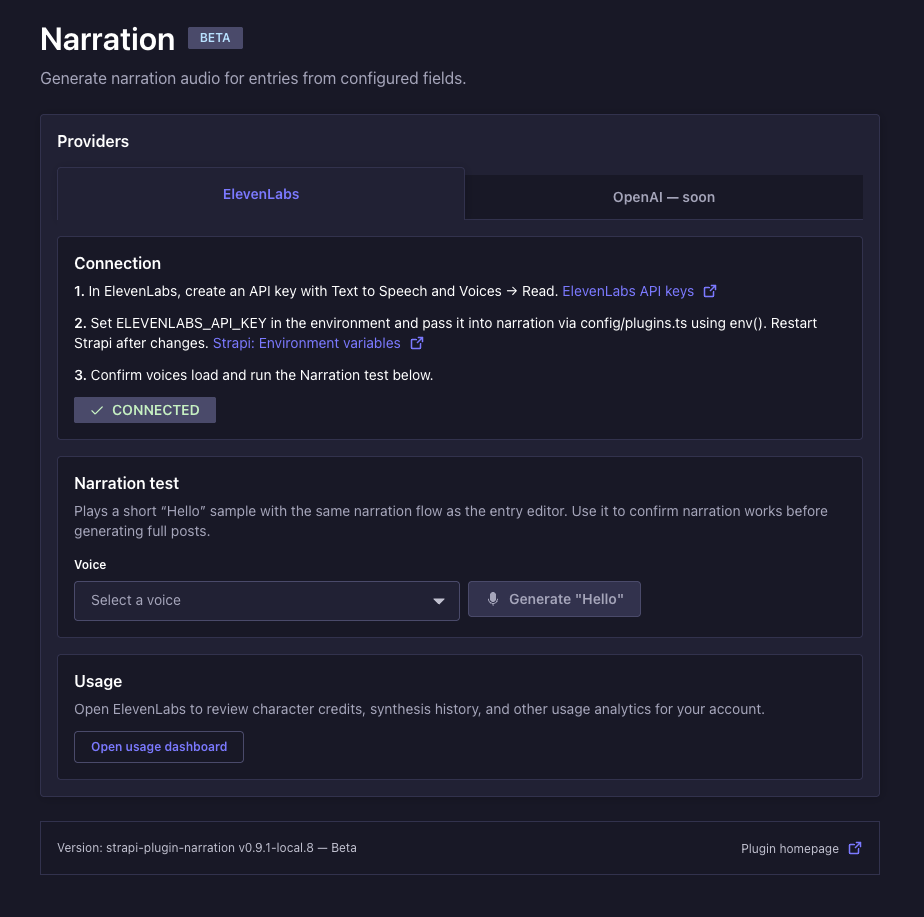
Plugin home — Settings → Plugins → Narration: connect ElevenLabs, run a quick TTS test, and open usage analytics.
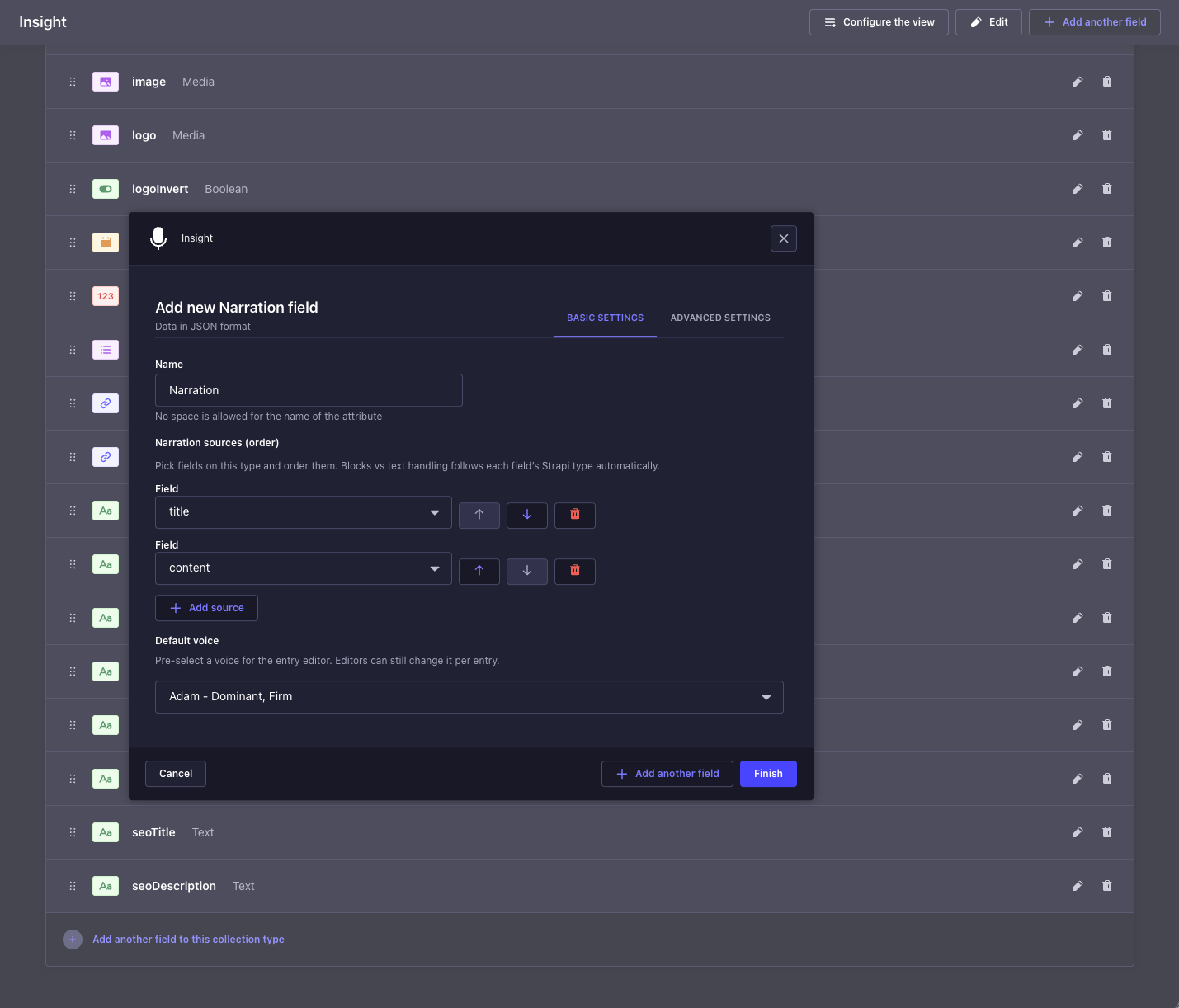
Configure the narration field — Content-Type Builder Basic settings: field name, Narration sources order, and Default voice.
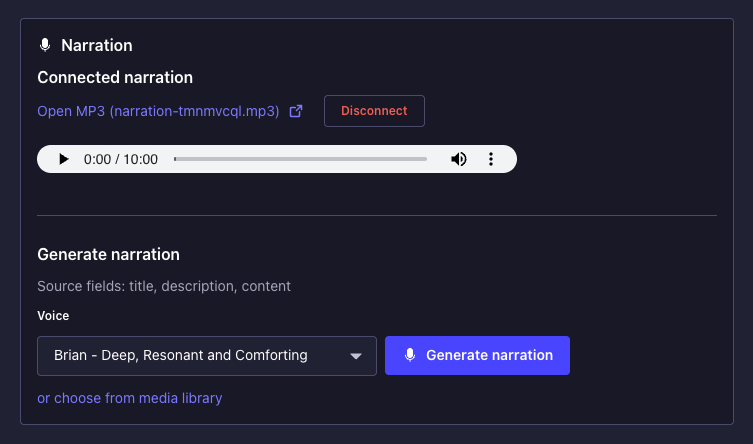
Generate narration — On an entry: pick a voice (or keep the default), then Generate narration; playback and disconnect controls appear after audio is linked.
Requirements
| Requirement | Details |
|---|---|
| Strapi | v5 (^5.0.0) |
| Node.js | >=20.0.0 <=24.x.x |
| ElevenLabs | Account + API key with Text to Speech and Voices → Read enabled |
Install
-
API key — ElevenLabs → Developers → API keys: create a key with Text to Speech and Voices → Read (both required for generation and the voice list in admin).
-
Package — in your Strapi project root:
npm install strapi-plugin-narration@0.10.3Beta (
0.x): use a pinned version (no^). CheckCHANGELOG.mdbefore upgrading.@strapi/design-system,@strapi/icons,react-intl, andyupmust match your Strapi install—avoid installing duplicate copies manually.
config/plugins.ts(orplugins.js— omit TypeScript type syntax if using.js):
export default ({ env }) => ({
  narration: {
    enabled: true,
    config: {
      apiKey: env("ELEVENLABS_API_KEY", ""),
      modelId: env("ELEVENLABS_MODEL_ID", "eleven_multilingual_v2"),
    },
  },
});
.env:
ELEVENLABS_API_KEY=sk_your_key_here- Build & start
npm run build
npm run develop
In admin: Settings → Plugins → Narration should appear.
Use it on a content type
- In the admin, open Content-Type Builder and pick (or create) the content type you want to narrate — for example, an
Articlewith atitleand acontentfield. - On that same content type, click Add another field → Custom fields → Narration. Name the new field
narration(or anything you like) and configure it:- Narration sources — the fields the plugin should read from, in the order they should be spoken.
- Default voice (required) — pick once in CTB; that voice appears in every entry editor for this field until an author selects a different voice (stored on the entry). You must configure it before saving the content type.
- Pause between narration sources (optional, under Speech synthesis) — adds extra silence between each source in the synthesized text (via an SSML
<break>), up to 3 seconds. Use 0 for the previous behaviour (\n\nonly). Behaviour depends on your ElevenLabs TTS model. - Strip text between custom delimiters (optional, under blocks filter) — add one or more start tag / end tag pairs. For each pair, narration removes the region from the first start through the matching end (including those tags) before TTS, and repeats until no match. Rows run in order — configure start
{{component:and end}}to drop manual component shortcodes such as{{component:hr}}. Strapi Blocks use structured JSONtypes in the REST payload; delimiter stripping applies to literal text in paragraphs.
- Save the content type. Strapi will rebuild the admin.
- Open or create an entry, save it once so the document exists in the database, then click Generate narration. An MP3 will land in your Media Library, and the field will remember which voice produced it.
Using narration on your frontend (REST)
Headless apps read the same narration field you defined in Content-Type Builder. Its API name matches the attribute name (including capitalization), so if you named it Narration in CTB, the JSON uses Narration, not narration.
Stored shape after generation (plain JSON):
{ "voiceId": "…", "audioFileId": 42 }audioFileId— Media Library file id for the MP3; use this to build playback URLs or download links.voiceId— ElevenLabs voice used for that clip (informational).
Resolve a public MP3 URL — call Strapi Upload’s file-by-id endpoint, then prepend your Strapi origin to the relative url field:
/**
 * @param {string} strapiOrigin  e.g. "https://cms.example.com" (no trailing slash)
 * @param {string|null} bearerToken  API token when the Upload API is restricted
 * @param {unknown} narrationField rest field value (`Narration`, `narration`, …)
 */
async function resolveNarrationAudioUrl(strapiOrigin, bearerToken, narrationField) {
  let obj = narrationField;
  if (typeof obj === "string") {
    try {
      obj = JSON.parse(obj);
    } catch {
      return null;
    }
  }
  if (!obj || typeof obj !== "object") return null;
  const rawId = /** @type {{ audioFileId?: unknown }} */ (obj).audioFileId;
  const id =
    typeof rawId === "number"
      ? rawId
      : typeof rawId === "string" && /^\d+$/.test(rawId.trim())
        ? Number(rawId.trim())
        : NaN;
  if (!Number.isFinite(id)) return null;

  const headers = bearerToken ? { Authorization: `Bearer ${bearerToken}` } : {};
  const res = await fetch(`${strapiOrigin}/api/upload/files/${id}`, {
    headers,
  });
  if (!res.ok) return null;

  const body = await res.json();
  const rel = body?.url ?? body?.data?.url;
  if (typeof rel !== "string" || !rel.length) return null;
  return new URL(rel, strapiOrigin).href;
}

// Example: fetch one entry — replace `articles` / `YOUR_FIELD_NAME` / slug with yours.
// Strapi 5 Draft & Publish: add `status=published` when you fetch from the Content API.
// If your REST payload nests fields under `attributes`, read `entry.attributes.YOUR_FIELD_NAME`.
const ORIGIN = "https://cms.example.com";
const TOKEN = process.env.STRAPI_READ_TOKEN ?? ""; // token with Upload `findOne` access if endpoints are restricted

const { data } = await fetch(`${ORIGIN}/api/articles?filters[slug][$eq]=my-post&status=published`, {
  headers: TOKEN ? { Authorization: `Bearer ${TOKEN}` } : {},
}).then((r) => r.json());

const entry = data?.[0];
const narration = entry?.YOUR_FIELD_NAME ?? entry?.attributes?.YOUR_FIELD_NAME;
const mp3 = await resolveNarrationAudioUrl(ORIGIN, TOKEN, narration);
if (mp3) {
  // <audio src={mp3} controls /> or pass to your player component
  console.log(mp3);
}
Grant your Content API token permission to find / findOne on upload (file metadata) if Strapi returns 403 on /api/upload/files/:id. If the file is publicly readable, you can sometimes skip the upload call and point <audio> at STRAPI_URL + url once you have it from a populated response — the pattern above works without relying on populate quirks for custom fields.
Advanced configuration
The default config block in Install is usually enough. If you need to tune behaviour, the full set of options lives in config/plugins.ts:
narration: {
  enabled: true,
  config: {
    apiKey: "",
    modelId: "eleven_multilingual_v2",
    /** Hard cap on characters per single generation. */
    maxChars: 50000,
    /** Skip real ElevenLabs calls; useful for staging. See "Dry-run mode" below. */
    ttsDryRun: false,
    /** Timeout for one ElevenLabs TTS request. */
    ttsRequestTimeoutMs: 8 * 60 * 1000,
    /**
     * Which provider tabs appear on the plugin home page.
     * Omit or set to [] to show all known providers.
     * Example: ["elevenlabs"] hides the OpenAI placeholder tab.
     */
    adminProviderTabs: ["elevenlabs", "openai"],
    /** Static voice list, for offline or locked-down environments. */
    voiceCatalog: [],
    /** How long to cache the live ElevenLabs voice list. 0 = always refetch. */
    voicesListCacheTtlMs: 24 * 60 * 60 * 1000,
  },
},
Dry-run mode (no ElevenLabs charge)
For staging environments where you want to test the full pipeline without burning ElevenLabs credits, add this to your .env:
STRAPI_NARRATION_TTS_DRY_RUN=trueGenerations now produce a placeholder MP3 instead of calling ElevenLabs.
.env value | What happens |
|---|---|
true, 1, yes, on | Placeholder MP3, no TTS request |
0, false, no, off | Real TTS (needs your API key) |
| not set | Uses config.ttsDryRun (default false) |
Strapi logs a warning at startup whenever dry-run mode is active so you don't forget to turn it off in production.
Troubleshooting
The Generate narration button doesn't appear
- Did you rebuild the admin after installing?
npm run build, then restart Strapi. - Did you save the entry first? The button needs a saved document.
- Are your Narration sources configured to point at fields that actually exist on this content type?
"ElevenLabs network error" on IPv6-first networks
On some networks, api.elevenlabs.io resolves to IPv6 first but your machine or VPN can't reach IPv6. You'll see undici errors like UND_ERR_SOCKET or "other side closed".
Fix: set this in your .env:
ELEVENLABS_DNS_IPV4_FIRST=1This switches Node's DNS resolution to prefer IPv4 for the entire process.
CTB shows a "Visibility condition" section for the Narration field
Strapi's Content-Type Builder renders that for every custom field. The plugin does not read it. You can ignore it for the narration field.
Narration works in admin but missing on the site / Content API
- If your content type uses Draft & Publish, generate and save, then click Publish (or publish again after changes). Publication updates the live document your website or
status=publishedREST queries use; a draft may still omit or lag the narration field until you publish. - Confirm your frontend asks for published entries (see the
statuspattern in Using narration on your frontend (REST) above).
More documentation
- Roadmap — planned directions and backlog (informal).
- Security policy — how to report vulnerabilities.
- Changelog — what changed and when.
- Contributing — for pull requests and bug reports.
- Code of Conduct — repository behaviour.
License
MIT — see LICENSE.
Built and maintained by IB Solutions — a systems integration consultancy.
Want help with Strapi or integrations like this?
We build the connections between CMS, AI, and the rest of your stack. Plugins like this one come out of that work.

