
Reactions
By VirtusLab
All-in-One reactions plugin for any Content Type. Simple & flexible.
Latest version
released February 9, 2026
npm install strapi-plugin-reactions
Strapi - Reactions plugin
All-in-One reactions plugin for any Content Type. Simple & flexible




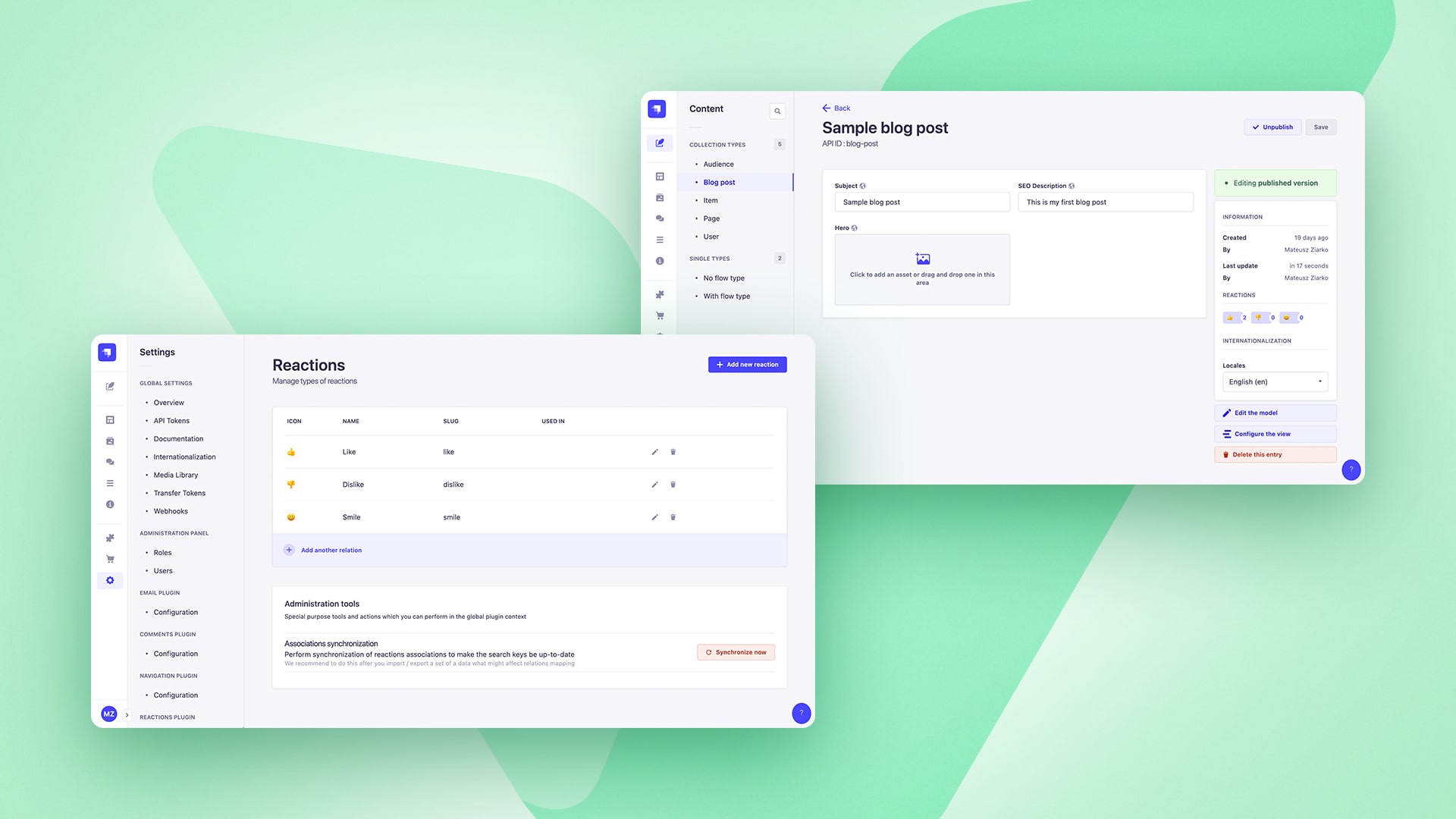
A plugin for Strapi Headless CMS that provides flexible & configurable reactions experience to any Content Types.
Table of Contents
- 💎 Versions
- ✨ Features
- ⏳ Installation
- 🖐 Requirements
- 🔧 Basic configuration
- 🔧 GraphQL Configuration
- 🕸️ Public API - REST
- 🕸️ Public API - GraphQL
- 🔌 Enrich service for Strapi extensions
- 💬 FAQ
- 🤝 Contributing
- 👨💻 Community support
💎 Versions
✨ Features
- Public REST & GraphQL API: Listing, setting, unsetting, toggling and much more via REST or GraphQL API. Easy to integrate with.
- Any Content Type relation: Reactions can be used to any of your Content Types without any special configuration.
- Emoji & Image reactions: You can define reaction types using predefined set of Emoji or use your own.
- Content Manager Injection Zone: Making use of Strapi built-in batteries like Injection Zones to provide you highers user experience. Visual representation of reactions counter for any Content Types - useful!
- Developer Experience boosted: A dedicated Enrich service provided to let you extend your Content API controllers by a single line to get reactions per each!
Request a feature by raising an issue.
⏳ Installation
Prerequisites
Database connection update
Because of Emoji usage, you will need (or maybe you already did it because of earlier requirements) to extend the database connection section in your Strapi project configuration.
// config/database.ts
// config/<env>/database.ts

connection: {
    charset: 'utf8mb4',
    collation: 'utf8mb4_unicode_ci',
    // your database credentials
}
Based on this specific charset, your emoji reactions are going to be saved in the database like a charm. See the reference issue raised on Strapi repository.
Via command line
(Use yarn to install this plugin within your Strapi project (recommended). Install yarn with these docs.)
yarn add strapi-plugin-reactions@latestAfter successful installation you've to re-build your Strapi instance. To archive that simply use:
yarn build
yarn develop
or just run Strapi in the development mode with --watch-admin option:
yarn develop --watch-adminThe Reactions plugin should appear in the Settings section of Strapi after you run app again.
As a next step you must configure your the plugin by adding types of reactions you want to use. See Configuration section.
All done. Enjoy 🎉
🖐 Requirements
Complete installation requirements are exact same as for Strapi itself and can be found in the documentation under Installation Requirements.
Minimum environment requirements
- Node.js
>=18.0.0 <=20.x.x - NPM
>=6.x.x
In our minimum support we're following official Node.js releases timelines.
Supported Strapi versions:
- Strapi v5.10.3 (recently tested)
- Strapi v5.x
Plugin dependencies
@strapi/plugin-graphql- required to run because built-in support for GraphQL handled by this plugin
We recommend always using the latest version of Strapi to start your new projects.
🔧 Configuration
To start your journey with Reactions plugin you must first setup types of reactions using the dedicated Settings page.
There is no need to provide any specific changed in the plugin configuration files extept enabling it.
export default () => ({
  //...
  reactions: {
    enabled: true,
    config: {
      gql: {...},
    },
  },
  //...
});
Properties
gql- If you're using GraphQL that's the right place to put all necessary settings. More here
🔧 GQL Configuration
Using reactions with GraphQL requires both plugins to be installed and working. You can find installation guide for GraphQL plugin here. To properly configure GQL to work with reactions you should provide gql prop. This should contain union types that will be used to define GQL response format for your data while fetching:
Important! If you're using
config/plugins.{js,ts}to configure your plugins , please putreactionsproperty beforegraphql. Otherwise types are not going to be properly added to GraphQL Schema. That's because of dynamic types which base on plugin configuration which are added onbootstrapstage, notregister. This is not valid if you're usinggraphqlplugin without any custom configuration, so most of cases in real.
related: ReactionRelatedThis prop should look as follows:
gql: {
    reactionRelated: ['<your GQL related content types>'],
},
for example:
gql: {
    reactionRelated: ['Page', 'BlogPost'],
},
where Page and BlogPost are your type names for the Content Types you're using reactions with.
👤 RBAC
Plugin provides granular permissions based on Strapi RBAC functionality.
Mandatory permissions
For any role different than Super Admin, to access the Reactions settings you must set following permissions:
- Plugins -> Reactions -> Reactions: Read - gives you the basic read access to Reactions settings
- Plugins -> Reactions -> Reactions: Change - you're able to change the configuration of plugin
- Plugins -> Reactions -> Reactions: Admin - you're able to perform administrator action in the global scope of a plugin
Data models
Reaction kind / type
{
  "documentId": "njx99iv4p4txuqp307ye8625",
  "name": "Like",
  "slug": "like",
  "emoji": "👍",
  "emojiFallbackUrl": "https://cdn.jsdelivr.net/npm/emoji-datasource-apple/img/apple/64/1f44d.png",
  "createdAt": "2023-09-14T20:13:01.649Z",
  "updatedAt": "2023-09-14T20:13:01.670Z",
  "icon": null
}
Reaction
{
  "documentId": "njx99iv4p4txuqp307ye8625",
  "kind": { // Type of reaction, not provided when listing by exact kind
    "documentId": "njx99iv4p4txuqp307ye8625",
    "slug": "like",
    "name": "Like"
  },
  "user": { // User who trigger reaction, not provided when listing by exact user
    "documentId": "njx99iv4p4txuqp307ye8625",
    "username": "Joe Doe",
    "email": "jdoe@sample.com",
  },
  "userId": "32", // Custom User ID provided if X-Reactions-Author header passed
  "createdAt": "2023-09-14T20:13:01.649Z",
  "updatedAt": "2023-09-14T20:13:01.670Z",
}
🕸️ Public REST API specification
Get reaction kinds / types
GraphQL equivalent: Public GraphQL API -> Get reaction kinds / types
GET <host>/api/reactions/kinds
Return a list of available reaction kinds to use on the end user interface and expose for interaction with users.
Example URL: https://localhost:1337/api/reactions/kinds
Example response body
[
  {
  "documentId": "njx99iv4p4txuqp307ye8625",
  "name": "Like",
  "slug": "like",
  "emoji": "👍",
  "emojiFallbackUrl": "https://cdn.jsdelivr.net/npm/emoji-datasource-apple/img/apple/64/1f44d.png",
  "createdAt": "2023-09-14T20:13:01.649Z",
  "updatedAt": "2023-09-14T20:13:01.670Z",
  "icon": null
  },
  // ...
]
List all reactions associated with Content Type
GraphQL equivalent: Public GraphQL API -> List all reactions associated with Content Type
GET <host>/api/reactions/list/single/<single type UID>?locale=<locale code>
GET <host>/api/reactions/list/collection/<collection type UID>/<documentId>?locale=<locale code>
Return all reactions associated with provided Collection / Single Type UID and Content Type Document ID with following combinations:
- all - if you're not providing the user context via
Authorizationheader - all related with Strapi user - if call is done with user context via
Authorizationheader - all related with non-Strapi user - if call is done with user ID via
X-Reactions-Authorheader
Example URL: https://localhost:1337/api/reactions/list/single/api::homepage.homepage?locale=en
Example URL: https://localhost:1337/api/reactions/list/collection/api::post.post/njx99iv4p4txuqp307ye8625?locale=en
Example response body
[
  {
    "documentId": "njx99iv4p4txuqp307ye8625",
    "createdAt": "2023-09-14T20:13:01.649Z",
    "updatedAt": "2023-09-14T20:13:01.670Z",
    "kind":{
      "documentId": "njx99iv4p4txuqp307ye8625",
      "slug": "like",
      "name": "Like"
    },
    "user":{ // Added if Strapi user context provided to identify who made such reaction
      "documentId": "njx99iv4p4txuqp307ye8625",
      "username": "mziarko+1@virtuslab.com",
      "email": "mziarko+1@virtuslab.com"
    },
    "userId": 17 // Added if non-Strapi user context provided to identify who made such reaction
  },
  // ...
]
List all reactions associated with particular user
GraphQL equivalent: Public GraphQL API -> List all reactions associated with particular user
GET <host>/api/reactions/list/user
GET <host>/api/reactions/list/user/<user id>
Return all reactions associated with provided user:
- for logged in user - if call is done with user context via
Authorizationheader - for specific Strapi user ID - if you're not providing the user context via
Authorizationheader and you're providing the user context viauser-idurl param - for specific non-Strapi user ID - if you're not providing the user context via
Authorizationheader and you're providing the user context viaX-Reactions-Authorheader
Example URL: https://localhost:1337/api/reactions/list/user
Example URL: https://localhost:1337/api/reactions/list/user/1
Example response body
[
  {
    "documentId": "njx99iv4p4txuqp307ye8625",
    "createdAt": "2023-09-14T20:13:01.649Z",
    "updatedAt": "2023-09-14T20:13:01.670Z",
    "kind":{
      "slug": "like",
      "name": "Like"
    },
    "related":{
      "documentId": "njx99iv4p4txuqp307ye8625",
      "id": 1,
      "locale": "en",
      //...
    }
  },
  // ...
]
List all reactions of kind / type associated with Content Type
GraphQL equivalent: Public GraphQL API -> List all reactions of kind / type associated with Content Type
GET <host>/api/reactions/list/<type slug>/single/<single type UID>?locale=<locale code>
GET <host>/api/reactions/list/<type slug>/collection/<collection type UID>/<documentId>?locale=<locale code>
Return all reactions of specific kind / type associated with provided Collection / Single Type UID and Content Type Document ID with following combinations:
- all - if you're not providing the user context via
Authorizationheader - all related with Strapi user - if call is done with user context via
Authorizationheader - all related with non-Strapi user - if call is done with user ID via
X-Reactions-Authorheader
Example URL: https://localhost:1337/api/reactions/list/like/single/api::homepage.homepage?locale=en
Example URL: https://localhost:1337/api/reactions/list/like/collection/api::post.post/njx99iv4p4txuqp307ye8625?locale=en
Example response body
[
  {
    "documentId": "njx99iv4p4txuqp307ye8625",
    "createdAt": "2023-09-14T20:13:01.649Z",
    "updatedAt": "2023-09-14T20:13:01.670Z",
    "user":{ // Added if Strapi user context provided to identify who made such reaction
      "documentId": "njx99iv4p4txuqp307ye8625",
      "username": "mziarko+1@virtuslab.com",
      "email": "mziarko+1@virtuslab.com"
    }
  },
  "userId": 17 // Added if non-Strapi user context provided to identify who made such reaction
  // ...
]
List all reactions of kind associated with particular user
GraphQL equivalent: Public GraphQL API -> List all reactions of kind associated with particular user
GET <host>/api/reactions/list/<type slug>/user
GET <host>/api/reactions/list/<type slug>/user/<user id>
Return all reactions of specific kind associated with provided user:
- for logged in user - if call is done with user context via
Authorizationheader - for specific Strapi user ID - if you're not providing the user context via
Authorizationheader and you're providing the user context viauser-idurl param - for specific non-Strapi user ID - if you're not providing the user context via
Authorizationheader and you're providing the user context viaX-Reactions-Authorheader
Example URL: https://localhost:1337/api/reactions/list/like/user
Example URL: https://localhost:1337/api/reactions/list/like/user/1
Example response body
[
  {
    "documentId": "njx99iv4p4txuqp307ye8625",
    "createdAt": "2023-09-14T20:13:01.649Z",
    "updatedAt": "2023-09-14T20:13:01.670Z",
    "kind":{
      "slug": "like",
      "name": "Like"
    },
    "related":{
      "documentId": "njx99iv4p4txuqp307ye8625",
      "id": 1,
      "locale": "en",
      //...
    }
  },
  // ...
]
Set reaction for Content Type
GraphQL equivalent: Public GraphQL API -> Set reaction for Content Type
POST <host>/api/reactions/set/<type slug>/single/<single type UID>?locale=<locale code>
POST <host>/api/reactions/set/<type slug>/collection/<collection type UID>/<documentId>?locale=<locale code>
Create reaction of specific kind / type associated with provided Collection / Single Type UID and Content Type Document ID.
To identify the reaction author, you must provide one of the following headers:
Authorization– use this header if you want to set a reaction for a Strapi user.X-Reactions-Author– use this header if you want to set a reaction for a non-Strapi user. The value can be any identifier that uniquely distinguishes the reaction author in your system.
Example URL: https://localhost:1337/api/reactions/set/like/single/api::homepage.homepage?locale=en
Example URL: https://localhost:1337/api/reactions/set/like/collection/api::post.post/njx99iv4p4txuqp307ye8625?locale=en
Example response body
{
  "documentId": "njx99iv4p4txuqp307ye8625",
  "createdAt": "2023-09-14T20:13:01.649Z",
  "updatedAt": "2023-09-14T20:13:01.670Z",
  "relatedUid": "api::post.post:njx99iv4p4txuqp307ye8625"
}
Unset reaction for Content Type
GraphQL equivalent: Public GraphQL API -> Unset reaction for Content Type
DELETE <host>/api/reactions/unset/<type slug>/single/<single type UID>?locale=<locale code>
DELETE <host>/api/reactions/unset/<type slug>/collection/<collection type UID>/<documentId>?locale=<locale code>
Delete reaction of specific kind / type associated with provided Collection / Single Type UID and Content Type Document ID.
To identify the reaction author, you must provide one of the following headers:
Authorization– use this header if you want to set a reaction for a Strapi user.X-Reactions-Author– use this header if you want to set a reaction for a non-Strapi user. The value can be any identifier that uniquely distinguishes the reaction author in your system.
Example URL: https://localhost:1337/api/reactions/unset/like/single/api::homepage.homepage?locale=en
Example URL: https://localhost:1337/api/reactions/unset/like/collection/api::post.post/njx99iv4p4txuqp307ye8625?locale=en
Example response body
trueToggle reaction for Content Type
GraphQL equivalent: Public GraphQL API -> Toggle reaction for Content Type
POST <host>/api/reactions/toggle/<type slug>/single/<single type UID>?locale=<locale code>
POST <host>/api/reactions/toggle/<type slug>/collection/<collection type UID>/<documentId>?locale=<locale code>
Toggle reaction of specific kind / type associated with provided Collection / Single Type UID and Content Type Document ID.
To identify the reaction author, you must provide one of the following headers:
Authorization– use this header if you want to set a reaction for a Strapi user.X-Reactions-Author– use this header if you want to set a reaction for a non-Strapi user. The value can be any identifier that uniquely distinguishes the reaction author in your system.
Example URL: https://localhost:1337/api/reactions/toggle/like/single/api::homepage.homepage?locale=en
Example URL: https://localhost:1337/api/reactions/toggle/like/collection/api::post.post/njx99iv4p4txuqp307ye8625?locale=en
Example response body
{
  "documentId": "njx99iv4p4txuqp307ye8625",
  "createdAt": "2023-09-14T20:13:01.649Z",
  "updatedAt": "2023-09-14T20:13:01.670Z",
  "relatedUid": "api::post.post:njx99iv4p4txuqp307ye8625"
}

// or

true
Possible scenarios
- No reaction set yet - Calling
togglefor a reaction sets that reaction. - Same reaction already set - Calling
togglefor a reaction that is already set will unset it (result: no reaction). - Different reaction already set - If another reaction is set, calling
togglefor a new reaction will switch to that reaction: the specified reaction becomes set, and any previously set reactions of that type are unset.
🕸️ Public GraphQL API specification
Testing
To test all queries and understand the schemas use GraphQL Playground exposed by
@strapi/plugin-graphqlonhttp://localhost:1337/graphql
Get reaction kinds / types
REST API equivalent: Public REST API -> Get reaction kinds / types
Return a list of available reaction kinds to use on the end user interface and expose for interaction with users.
Example request
query {
  reactionKinds {
      slug
      name
      emoji
    icon {
      url
    }
  }
}
Example response body
{
  "data": {
    "reactionKinds": [
      {
        "slug": "like",
        "name": "Like",
        "emoji": "👍",
        "icon": null
      }
    ]
  }
}
List all reactions associated with Content Type
REST API equivalent: Public REST API -> List all reactions associated with Content Type
Return all reactions associated with provided Collection / Single Type UID and Content Type Document ID with following combinations:
- Query
reactionsList– returns all reactions for the specified document. NoAuthorizationheader is required (public access). - Query
reactionsListPerUser– returns reactions added by a specific author. One of the following headers is required:Authorization– to fetch reactions for a Strapi user.X-Reactions-Author– to fetch reactions for a non-Strapi user, identified by any custom author ID.
Example request
query {
  reactionsList(uid: "api::post.post", documentId: "njx99iv4p4txuqp307ye8625", locale: "en") {
    documentId
    kind {
      slug
      name
      emoji
    }
    user {
      email
    }
  }
}
query {
reactionsListPerUser(uid: "api::post.post", documentId: "njx99iv4p4txuqp307ye8625", locale: "en") {
documentId
kind {
slug
name
emoji
}
}
}Example response body
{
  "data": {
    "reactionsList": [
      {
        "documentId": "njx99iv4p4txuqp307ye8625",
        "kind": {
          "slug": "like",
          "name": "Like",
          "emoji": "👍"
        },
        "user": {
          "email": "mziarko+1@virtuslab.com"
        },
        "createdAt": "2023-09-14T20:13:01.670Z"
      }
    ]
  }
}
// --------------------------------
{
  "data": {
    "reactionsListPerUser": [
      {
        "documentId": "njx99iv4p4txuqp307ye8625",
        "kind": {
          "slug": "like",
          "name": "Like",
          "emoji": "👍"
        },
        "createdAt": "2023-09-14T20:13:01.670Z"
      }
    ]
  }
}
List all reactions associated with particular user
REST API equivalent: Public REST API -> List all reactions associated with particular user
Return all reactions associated with provided user:
- Query
reactionsListAllPerUser– one of the following headers is required:Authorization– to fetch reactions for a Strapi user.X-Reactions-Author– to fetch reactions for a non-Strapi user, identified by any custom author ID.
Example request
query {
  reactionsListAllPerUser {
    documentId
    createdAt
    kind {
      slug
    }
    related {
      documentId
      id
      locale
    }
  }
}
query {
reactionsListAllPerUser(userId: 1) {
documentId
createdAt
kind {
slug
}
related {
documentId
id
locale
}
}
}Example response body
{
  "data": {
    "reactionsListAllPerUser": [
      {
        "documentId": "njx99iv4p4txuqp307ye8625",
        "createdAt": "2023-09-14T20:13:01.670Z",
        "kind": {
          "slug": "like"
        },
        "related": {
          "documentId": "njx99iv4p4txuqp307ye8625",
          "id": 1,
          "locale": "en"
        }
      }
    ]
  }
}
List all reactions of kind / type associated with Content Type
REST API equivalent: Public REST API -> List all reactions of kind / type associated with Content Type
Return all reactions of specific kind / type associated with provided Collection / Single Type UID and Content Type Document ID with following combinations:
- Query
reactionsList– returns all reactions for the specified document. NoAuthorizationheader is required (public access). - Query
reactionsListPerUser– returns reactions added by a specific author. One of the following headers is required:Authorization– to fetch reactions for a Strapi user.X-Reactions-Author– to fetch reactions for a non-Strapi user, identified by any custom author ID.
Example request
query {
  reactionsList(kind: "like", uid: "api::post.post", documentId: "njx99iv4p4txuqp307ye8625", locale: "en") {
    documentId
    user {
      email
    }
    createdAt
  }
}
query {
reactionsListPerUser(kind: "like", uid: "api::post.post", documentId: "njx99iv4p4txuqp307ye8625", locale: "en") {
documentId
createdAt
}
}Example response body
{
  "data": {
    "reactionsList": [
      {
        "documentId": "njx99iv4p4txuqp307ye8625",
        "user": {
          "email": "mziarko+1@virtuslab.com"
        },
        "createdAt": "2023-09-14T20:13:01.670Z"
      }
    ]
  }
}
// --------------------------------
{
  "data": {
    "reactionsListPerUser": [
      {
        "documentId": "njx99iv4p4txuqp307ye8625",
        "createdAt": "2023-09-14T20:13:01.670Z"
      }
    ]
  }
}
List all reactions of kind associated with particular user
REST API equivalent: Public REST API -> List all reactions of kind associated with particular user
Return all reactions of specific kind associated with provided user:
- Query
reactionsListAllPerUser– one of the following headers is required:Authorization– to fetch reactions for a Strapi user.X-Reactions-Author– to fetch reactions for a non-Strapi user, identified by any custom author ID.
Example request
query {
  reactionsListAllPerUser(kind: "like") {
    documentId
    createdAt
    related {
      documentId
      id
      locale
    }
  }
}
query {
reactionsListAllPerUser(kind: "like", userId: 1) {
documentId
createdAt
related {
documentId
id
locale
}
}
}Example response body
{
  "data": {
    "reactionsListAllPerUser": [
      {
        "documentId": "njx99iv4p4txuqp307ye8625",
        "createdAt": "2023-09-14T20:13:01.670Z",
        "related": {
          "documentId": "njx99iv4p4txuqp307ye8625",
          "id": 1,
          "locale": "en"
        }
      }
    ]
  }
}
Set reaction for Content Type
REST API equivalent: Public REST API -> Set reaction for Content Type
Create reaction of specific kind / type associated with provided Collection / Single Type UID and Content Type Document ID.
To identify the reaction author, you must provide one of the following headers:
Authorization– use this header if you want to set a reaction for a Strapi user.X-Reactions-Author– use this header if you want to set a reaction for a non-Strapi user. The value can be any identifier that uniquely distinguishes the reaction author in your system.
Example request
mutation reactionSet {
  reactionSet(
    input: {
      kind: "like",
      uid: "api::post.post",
      documentId: "njx99iv4p4txuqp307ye8625",
      locale: "en"
    }
  ) {
    documentId
  }
}
Example response body
{
  "data": {
    "reactionSet": {
      "documentId": "njx99iv4p4txuqp307ye8625"
    }
  }
}
Unset reaction for Content Type
REST API equivalent: Public REST API -> Unset reaction for Content Type
Delete reaction of specific kind / type associated with provided Collection / Single Type UID and Content Type Document ID.
To identify the reaction author, you must provide one of the following headers:
Authorization– use this header if you want to set a reaction for a Strapi user.X-Reactions-Author– use this header if you want to set a reaction for a non-Strapi user. The value can be any identifier that uniquely distinguishes the reaction author in your system.
Example request
mutation reactionUnset {
  reactionUnset(
    input: {
      kind: "like",
      uid: "api::post.post",
      documentId: "njx99iv4p4txuqp307ye8625",
      locale: "en"
    }
  ) {
    documentId
  }
}
Example response body
{
  "data": {
    "reactionUnset": {
      "documentId": null
    }
  }
}
Toggle reaction for Content Type
REST API equivalent: Public REST API -> Toggle reaction for Content Type
Toggle reaction of specific kind / type associated with provided Collection / Single Type UID and Content Type Document ID.
To identify the reaction author, you must provide one of the following headers:
Authorization– use this header if you want to set a reaction for a Strapi user.X-Reactions-Author– use this header if you want to set a reaction for a non-Strapi user. The value can be any identifier that uniquely distinguishes the reaction author in your system.
Example request
mutation reactionToggle {
  reactionToggle(
    input: {
      kind: "like",
      uid: "api::post.post",
      documentId: "njx99iv4p4txuqp307ye8625",
      locale: "en"
    }
  ) {
    documentId
  }
}
Example response body
{
  "data": {
    "reactionToggle": {
      "documentId": "njx99iv4p4txuqp307ye8625"
    }
  }
}

// or

{
  "data": {
    "reactionToggle": {
      "documentId": null
    }
  }
}
Possible scenarios
- No reaction set yet - Calling
togglefor a reaction sets that reaction. - Same reaction already set - Calling
togglefor a reaction that is already set will unset it (result: no reaction). - Different reaction already set - If another reaction is set, calling
togglefor a new reaction will switch to that reaction: the specified reaction becomes set, and any previously set reactions of that type are unset.
🔌 Enrich service for Strapi extensions
Enrich One
You can use this service method for example in your Strapi Content API findOne method to enrich the metadata of retrieved entity by associated reactions.
What is important, service method does not modify default data schema of Strapi Content API. All additions are made in the meta property in the form of:
// ...
"meta": {
  // ...
  "reactions": {
    "<type slug>": [
      // list of reactions
    ],
    // ...
  }
}
Example extension
// src/api/post/controllers/post.ts

'use strict';

/**
 *  post controller
 */

import { factories } from '@strapi/strapi'

export default factories.createCoreController('api::post.post', ({ strapi }) => ({
  async findOne(ctx) {
    const response = await super.findOne(ctx);

    return strapi
      .service('plugin::reactions.enrich')
      .enrichOne('api::post.post', response);
  },
}));
Example response
{
  "data":{
    "documentId": "njx99iv4p4txuqp307ye8625",
    "attributes":{
      // Content type attributes
    }
  },
  "meta":{
    "reactions":{
      "like":[{
          "documentId": "njx99iv4p4txuqp307ye8625",
          "createdAt": "2023-09-14T20:13:01.649Z",
          "updatedAt": "2023-09-14T20:13:01.670Z",
          "relatedUid": "api::post.post:2",
          "kind":{
            "documentId": "njx99iv4p4txuqp307ye8625",
            "name": "Like",
            "slug": "like",
            "emoji": "👍",
            "emojiFallbackUrl": "https://cdn.jsdelivr.net/npm/emoji-datasource-apple/img/apple/64/1f44d.png",
            "icon": null
          },
          "user":{
            "documentId": "njx99iv4p4txuqp307ye8625",
            "username": "mziarko+1@virtuslab.com",
            "email": "mziarko+1@virtuslab.com"
          }
        },
        // ...
      ],
    // ...
    }
  }
}
Enrich Many
You can use this service method for example in your Strapi Content API find method to enrich the metadata of retrieved entities set by associated reactions.
What is important, service method does not modify default data schema of Strapi Content API. All additions are made in the meta property in the form of:
// ...
"meta": {
  // ...
  "reactions": {
    "<content type id>": {
      "<type slug>": [
        // list of reactions
      ],
      // ...
    }
  }
}
Example extension
// src/api/post/controllers/post.ts

'use strict';

/**
 *  post controller
 */

import { factories } from '@strapi/strapi'

export default factories.createCoreController('api::post.post', ({ strapi }) => ({
  async find(ctx) {
    const response = await super.find(ctx);

    return strapi
      .service('plugin::reactions.enrich')
      .enrichMany('api::post.post', response);
  },
}));
Example response
{
  "data": [{
      "documentId": "njx99iv4p4txuqp307ye8625",
      "attributes":{
        // Content type attributes
      }
    }, {
      "documentId": 2,
      "attributes":{
        // Content type attributes
      }
    }
  ],
  "meta":{
    "reactions":{
      "njx99iv4p4txuqp307ye8625": {
        "like":[{
            "documentId": "njx99iv4p4txuqp307ye8625",
            "createdAt": "2023-09-14T20:13:01.649Z",
            "updatedAt": "2023-09-14T20:13:01.670Z",
            "relatedUid": "api::post.post:2",
            "kind":{
              "documentId": "njx99iv4p4txuqp307ye8625",
              "name": "Like",
              "slug": "like",
              "emoji": "👍",
              "emojiFallbackUrl": "https://cdn.jsdelivr.net/npm/emoji-datasource-apple/img/apple/64/1f44d.png",
              "icon": null
            },
            "user":{
              "documentId": "njx99iv4p4txuqp307ye8625",
              "username": "mziarko+1@virtuslab.com",
              "email": "mziarko+1@virtuslab.com"
            }
          },
          // ...
        ],
      // ...
      },
      "2": {}
    }
  }
}
💬 FAQ
Import / Export
Q: I'm exporting / moving data between environments. Will I lost all reactions?
A: No you won't lost anything. Reactions plugin is based on real relations (Polymorphic relations) and all the data should be exported / moved and re-indexed properly on your new environment.
The only thing you might need to do after import is described below ⬇️
Q: I've imported data to the new instance and I'm not seeing reaction linked to my Content Types or they are wrong. What to do?
A: Most probably after the import unique identifiers of your Content Types has changed according to the new environment.
You might need to use one of special admin actions for the Reactions plugin like "Synchronize associations". To get access to it, you must be Super Admin or have assigned Settings: Admin permission to any of your roles.
This is not destructive action and it just goes through all existing Reactions and update their search key according to linked Content Type UID and ID like api::post.post:njx99iv4p4txuqp307ye8625.
🤝 Contributing
Feel free to fork and make a Pull Request to this plugin project. All the input is warmly welcome!
-
Clone repository
git clone git@github.com:VirtusLab-Open-Source/strapi-plugin-reactions.git -
Run
install&watch:linkcommand// Install all dependencies yarn install // Watch for file changes using `plugin-sdk` and follow the instructions provided by this official Strapi developer tool yarn watch:link -
Within the Strapi project, modify
config/plugins.{js,ts}forimgix
//...
'reactions': {
  enabled: true,
  //...
}
//...- Run your Strapi instance
👨💻 Community support
For general help using Strapi, please refer to the official Strapi documentation. For additional help, you can use one of these channels to ask a question:
- Discord We're present on official Strapi Discord workspace. Find us by
[VirtusLab]prefix and DM. - Slack - VirtusLab Open Source We're present on a public channel #strapi-molecules
- GitHub (Bug reports, Contributions, Questions and Discussions)
- E-mail - we will respond back as soon as possible
📝 License
MIT License Copyright (c) VirtusLab Sp. z o.o. & Strapi Solutions.

